


The intuitive trading platform TWS Mosaic
The Mosaic variant of TWS is characterized by its intuitive design and immediate usability. It provides quick and easy access to comprehensive trading, order management, chartering, watchlist and portfolio tools, combining them in a single, customizable workspace.
PERFECT FOR TRADER & INVESTOR
With the help of our real-time control system in TWS, you can check the current status of your account at any time. This puts you a decisive step ahead of others in a constantly changing market environment.
For more information about the account window in TWS, see the following page: TWS account window
Account overview
Here you can view your account balances, margin data, your available balance for trading, market value and portfolio data for all your products in a customizable and clear account overview.
Watchlists
Create watchlists where you can monitor real-time based price quotes based on your market data subscriptions. To suit your personal trading methods, you can create, zoom in/out and move multiple individually named watchlist windows.
Margin requirements
Keep track of your margin requirements. Quick overviews of potential shortfalls help you avoid position liquidations. Also use the "what if" portfolio margin calculation to view your margin requirements using the portfolio margining system.
Alarms
Create real-time price, time, margin, and volume alerts that inform you of important changes in the market environment.
Versions
Review daily executions and net trading volumes by ticker symbol in our expandable transaction reports.
Profit and loss
Check your G&V in the trading window and in the account overview.
You are currently viewing placeholder content from Youtube. To access the actual content, click the button below. Please note that doing so will share data with third-party providers.
More InformationTWS Mosaic: Intuitive and powerful
The Mosaic version of TWS is characterized by its intuitive design and immediate usability. It provides quick and easy access to comprehensive trading, order management, chartering, watchlist and portfolio tools.
The customizable workspace can be arranged according to your own needs and popular tools, making advanced order entry easy.
TWS software download
Click on one of the TWS versions below to download and install the award-winning trading platform. Once the software is installed, you can log into the platform.
TWS for Mac OSX
TWS Latest for Linux (64bit)
Tip: Optimizing working memory for TWS use
Note: The complex TWS requires a little training time, after which you no longer want to miss the benefits of this professional interface. You quickly feel that the knowledge from more than three decades of pure stock market trading is here. The software is available for all conceivable solutions: from Windows, Mac and Linux versions to mobile app solutions for Android and iOS end devices.
Get to know the TWS
Use a paper trading account to optimize your trading skills with TWS in a simulated trading environment and bring investment strategies to perfektiobn.
Video trainings to TWS
In our Trader Workstation training videos you will learn all the important functions from the basics to the Portfolio Analyst to prepare yourself optimally.

Open a custody account now and Use TWS
As a CapTrader client, you can use the professional Trader Workstation and other trading platforms free of charge to optimize the speed and efficiency of your trading activities.
Frequently asked questions about Trader Workstation
For more information, please visit our Help Center
Can I import index lists into TWS?
As a CapTrader customer, you can import selected index lists into your TWS free of charge in the exclusive customer area. Thus, all individual securities are clearly available to you in individual watch lists.
Log in to the Trading Academy and download the lists in the >Webinar Materials category for free: Login Trading Academy
What are the system requirements for TWS?
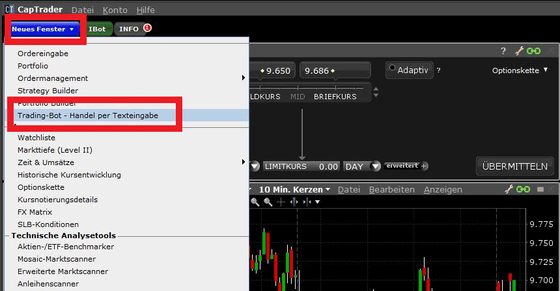
How do I open the IBot in the TWS?
Click in the drop-down menu "New window" in the Mosaic layout of TWS under the heading "Trading" on "IBot (Beta) - Trading via text input".
MORE THAN 1.2 MILLION VALUE PAPERS AT SENSATIONAL CONDITIONS

Stocks

Options

Futures

Forex

ETFs

Warrants

Bonds
