


A new standard in trading technology
CapTrader Desktop revolutionizes the way traders interact with the markets. The platform combines an intuitive user interface with professional features. Developed based on feedback from traders, the platform offers everything you need - without unnecessary complexity.
Intuitively designed: Modern, clear interface that beginners can quickly master and that impresses professionals with its depth
Precision tools Advanced charts with over 100 indicators, level 2 data and sophisticated order types for precise execution
Global market access Trade stocks, options, futures, forex, bonds and funds on over 160 markets from a single platform
Lightning fast Built on state-of-the-art architecture for immediate response times and reliable execution
Professional order types: From simple market orders to complex algorithmic strategies - all the tools for successful trading
Maximum security: Two-factor authentication, encrypted connections and regulated by leading financial supervisory authorities
Cross-platform: Seamless synchronization between desktop, web and mobile for uninterrupted trading
Suitable for every level: From beginners with simplified modes to professionals with advanced functions - the platform grows with your skills
No hidden costs: Transparent price structure without platform fees or hidden costs for market data
Multilingual support: Available in 10 languages with local customer support for German-speaking traders
CapTrader Desktop Download
Download the software. You will find the link below. Then log in with your existing account access data.
CapTrader Desktop for Windows PC
CapTrader Desktop for Mac OSX
Customizable workspaces
Create unlimited layouts tailored to your trading style – with simple drag-and-drop
Watchlists
Create watchlists where you can monitor real-time based quotes based on your market data subscriptions. To suit your personal trading methods, you can create, zoom in/out and move multiple individually named watchlist windows.
Margin requirements
Keep track of your margin requirements. Quick overviews of potential shortfalls help you avoid position liquidations. Also use the "what if" portfolio margin calculation to view your margin requirements using the portfolio margining system.
Alarms
Create real-time price, time, margin, and volume alerts that inform you of important changes in the market environment.
Versions
Check out daily executions and net trading volumes by ticker symbol in our expandable transaction reports.
Profit and loss
Check your G&V in the trading window and in the account overview.
Everything you need for successful trading
With CapTrader Desktop, you get access to a comprehensive set of professional trading tools specifically designed to optimize your trading decisions. From the intuitive user interface to advanced analytics, every feature is designed to give you a decisive edge in the markets.
Complete portfolio control at a glance
Portfolio management in CapTrader Desktop provides you with a central command center for all your investments. Keep track of your positions, monitor your performance in real time and make informed decisions based on current market data. The intuitive display makes it easy to identify risks and seize opportunities - all in one clear dashboard.
Real-time position management
Monitor your entire portfolio with live updates:
- Current positions with real-time P&L
- Account balances in all currencies
- Margin requirements and purchasing power
- Risk metrics continuously updated
Fast order placement
Execute trades with confidence by using our optimized order ticket:
- Automatic filling in of prices from Bid/Ask
- Preview of total costs including fees
- Automatic attachment of stop-loss and take-profit orders
- Save complex orders as templates
Professional analysis tools
Different chart types & time frames
- Candlestick, OHLC, line and area charts
- 1-minute to monthly time frame
- Visualization of extended trading (pre-market and after-hours)
- Multi-chart layouts for different perspectives
Over 100 technical indicators
- Popular indicators such as VWAP, EMA, SMA, RSI, MACD
- Customizable colors, periods and parameters
- Save indicator templates for quick use
- Overlaid or separate indicator panels
Drawing & annotation tools
- Trend lines, channels and Fibonacci retracements
- Support/resistance levels
- Pattern recognition tools
- Save and share chart layouts

Order types for every situation
Standard orders
- Market, Limit, Stop, Stop-Limit
- Good-Till-Canceled (GTC)
- Fill-or-kill (FOK)
- Trading outside regular trading hours
Extended order functions
- Bracket OrdersAutomatic profit target and stop loss
- One-Cancels-Other (OCO): Linked orders for different scenarios
- Trailing stopsDynamic risk management
- Algorithmic ordersVWAP, TWAP and more
Visual order management
- Drag orders directly onto charts for modification
- See order levels above the price movement
- One-click order cancellation or modification
- Color-coded order status tracking
Everything for the options trader
Interactive option chain
- Real-time Greeks display
- Analysis of implied volatility
- Volume and open interest data
- Fast strategy development
Strategy Builder & Analyzer
- Visual strategy structure with point-and-click
- Supported strategiesVerticals, Diagonals, Butterflies, Iron Condors, individual combinations
- Risk graphics show profit/loss scenarios
- Probability calculator for success rates
Options Wizard (Exclusive Feature) Answer simple questions about your market outlook and get:
- Recommended strategies that match your forecast
- Side-by-side comparisons of strategies
- Adjustable assumptions for what-if analyses
- Direct execution from the wizard


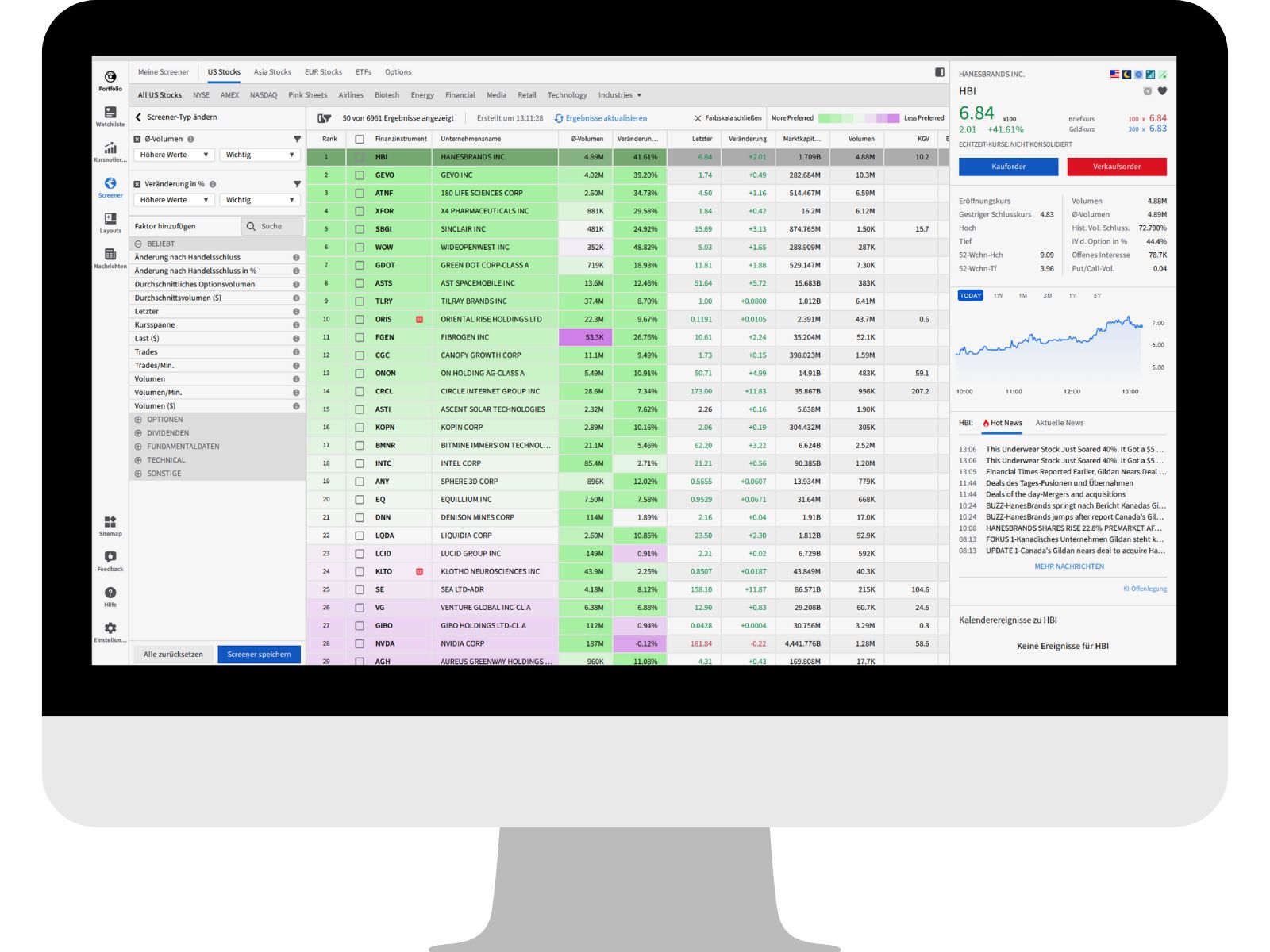
MultiSort Screener technology
Revolutionary screening approach In contrast to conventional scanners that filter, ranks CapTrader Desktop's MultiSort technology ranks stocks according to how well they fulfill ALL your criteria at the same time.
Screen for over 50 factors, including:
- Price and volume movements
- Market capitalization
- Fundamental key figures
- Technical indicators
- Volatility measurements
- Insider/institutional shareholdings
Pre-prepared scans for quick access:
- Top winners/losers
- Unusual volume
- Gap ups/downs
- Dividend Aristocrats
- Momentum mover
Unlimited layout options
Workspace templates
- Start with ready-made layouts for different trading styles
- Basic Trading, Options Focus, Day Trading Setups
- Save an unlimited number of user-defined layouts
- Change layouts instantly based on market conditions
Window link
- Colour-coded synchronization
- Change symbol once, update everywhere
- Independent or linked charts
Multi-monitor support
- Distribute your workspaces across several screens
- Optimal use of your trading setup
- Seamless window shifting between monitors

CapTrader Desktop in comparison
| Feature | CapTrader Desktop | Other platforms |
|---|---|---|
| User friendliness |  Intuitive for beginners and professionals Intuitive for beginners and professionals |  Often too complex or too simple Often too complex or too simple |
| Chart functions | 100+ indicators, multiple time frames |  Limited selection Limited selection |
| Order types | All standard and extended types | Mostly only basic orders |
| Option trading | Complete suite with wizard | Separate tools required |
| Multisort screener | Revolutionary ranking technology | Simple filters only |
| Global markets | 160+ markets worldwide | Limited selection |
| Level 2 data | Available | Often additional costs |
| Customizability | Fully customizable | Fixed layouts |
| Multi-Monitor | Native support | Not available |
| Costs | No platform fees | Monthly fees |
Successful trading in just a few steps
The perfect start with CapTrader Desktop
1. download & installation Download CapTrader Desktop and install the platform in a few minutes
2. login with your CapTrader account Use your existing CapTrader access data
3. select layout Start with one of our ready-made templates or create your own layout
4. explore markets Use our screeners and watchlists to identify trading opportunities
5. demo trading Practice risk-free with our Demo accountbefore you trade with real money
The trading platforms at Captrader at a glance
The depot for your needs
Get started right away
Try it out without obligation
Frequently asked questions about CapTrader Desktop
For more information, please see our FAQs and in the Help Center
Is CapTrader Desktop free of charge?
Yes, CapTrader Desktop is free for all CapTrader customers. There are no additional platform fees.
What are the system requirements for CapTrader Desktop?
CapTrader Desktop runs on Windows (10 or higher) and macOS (10.14 or higher). A stable internet connection is required.
Can I use CapTrader Desktop in parallel with other platforms?
Yes, you can use CapTrader Desktop simultaneously with the CapTrader App, Easy App, or Trader Workstation.
Does CapTrader Desktop support automated trading?
CapTrader Desktop offers algorithmic orders and advanced order types. For fully automated trading, we recommend the Trader Workstation with API connectivity.
Are my settings saved?
Yes, all your layouts, watchlists, and settings are stored in the cloud and accessible from any device.
MORE THAN 1.2 MILLION VALUE PAPERS AT SENSATIONAL CONDITIONS

Stocks

Options

Futures

Forex

ETFs

Warrants

Bonds
