


A sell limit order (also: limit sell or sell limit) is a sell order that can be used to open a short position or as a take profit order for a long position. You define in advance a price at which you want to sell the underlying. In this article you will learn how a sell limit order works, what you have to pay attention to when placing the order and when it makes sense to use it.
What is a Sell Limit Order?
With a Sell Limit Order, the broker is given the order to sell a financial instrument at a limit price defined by you or at a higher price. The order will only be executed if the price limit can be met.
You thus set a minimum price at which you are willing to sell. In contrast to a market order or a stop order, the sell order is only executed if the limit price is equal to or better than the actual execution price. Slippage (a change in the actual execution price to your disadvantage) is not possible.
Example: Sell Limit Order Nike Share
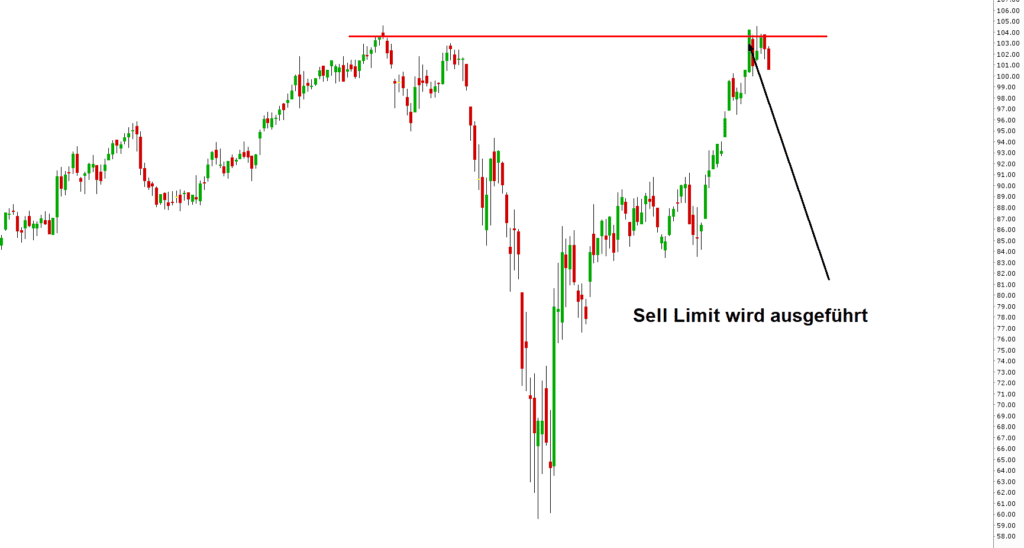
Imagine that you took advantage of the market slump at the beginning of 2020 to open a long position in Nike stock. After you have the stock in your portfolio and it starts to rise rapidly, you decide to take profits if the stock continues to rise. The old highs are at around $104 per share. If the stock rises to this price range, it is not unlikely that there will be at least an interim setback.

To automatically execute a sell or partial sell when the target price is reached, you can create a Limit Sell Order. The sell order will be executed as soon as the share reaches the limit price you have selected and an execution at this or a higher price can be guaranteed.
Create Sell Limit Order in TWS and Trading App
To place a sell limit order in the Trader Workstation or in the CapTrader Trading App to create a sell order, select a sell order and then change the order type to "LMT" for a limit order. The detailed procedure is described in the article Limit order.