If your TWS "freezes" after startup, it is often because the load on your computer is increased.
Please follow these instructions to increase the memory allocated to the Trader Workstation TWS.
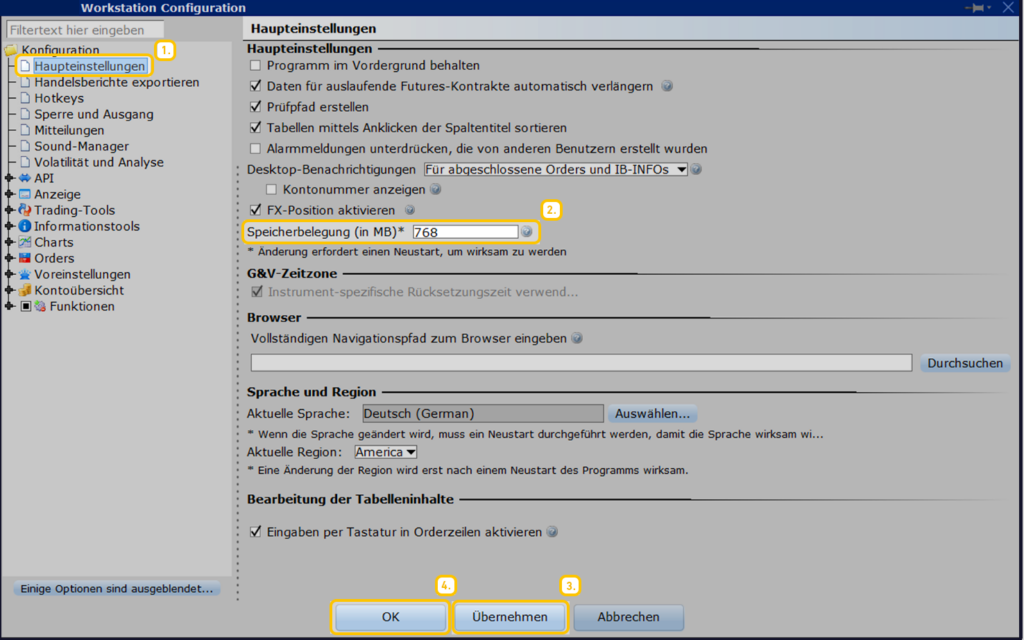
Start the Trader Workstation (TWS) and click on the > icon. Settings.

- Now, in the new window on the left, select the category > Main settings
- Then, in the large window, change the value of the field > Memory usage (in MB) from 768 (old) to > 1536 (new).
- Now confirm the change by clicking the > button. Apply and
- close the process by clicking the > button. OK now off.