


With a Buy Stop Order (also: Stop Buy Order) you can buy a stock, an ETF, a futures contract, a currency or another financial instrument at a predefined price as soon as this price is exceeded. The buy stop order is a type of order that is used very often, especially among active traders, for example to trade chart breakouts or to limit losses of a short position. The advantage is the immediate execution when the stop price is reached. However, in volatile and/or illiquid markets, there can sometimes be a mismatch between the stop price and the actual execution price. In this article you will learn what a buy stop order is, when its use makes sense and what you should pay attention to.
What is a Buy Stop Order?
With a buy stop order, the broker is given the order to buy a financial instrument as soon as a previously defined price is reached or exceeded. When the stop price is reached, the buy stop order is converted into a market order, i.e. execution takes place immediately at the next possible tradable price. The actual execution price may therefore differ from the previously defined stop price.
To avoid the risk of slippage (a change in the actual execution price to your disadvantage), you have the option to use a Stop Limit Order. Here, when the target price is reached, the buy order is not converted into a market order, but into a limit buy order. The disadvantage of this type of order is that you may not receive execution if the next tradable price is above your limit price.
The price of a buy stop order should be above the current price level. Although you can also choose a stop price below the current price, this would result in the order being executed immediately and would thus serve the same purpose as a market order. To buy a financial instrument at a lower price than the current price once it is reached, a Limit Buy Order is suitable.
Example: Buy Stop Order Dax Future
The following example illustrates how a buy stop order works and shows a possible use:
The DAX Future (March 2021 contract) is quoted here a few points below the chart resistance at 13,700 points.
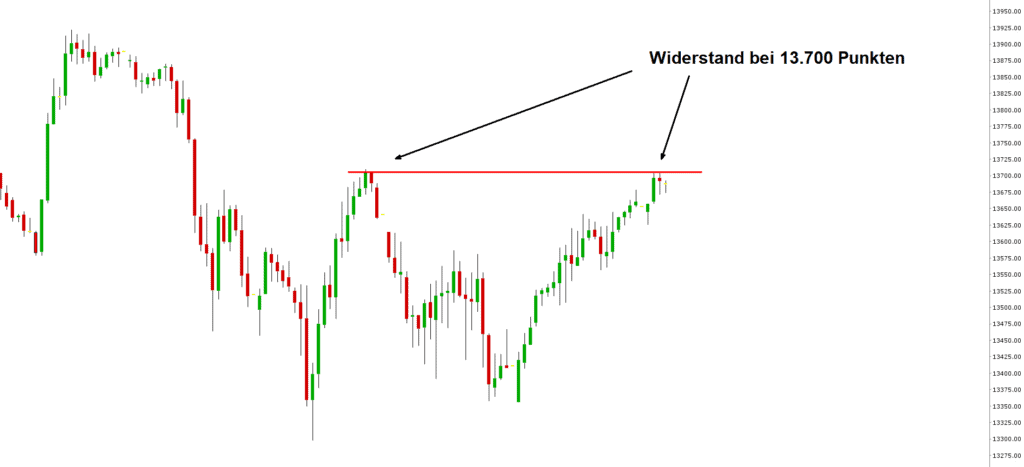
A Buy Stop Order can be used to execute an automatic buy order when a price is exceeded
If you decide to trade the breakout above the previous high and the newly emerging uptrend, you can place a buy stop order at the breakout level or a few points above it - for example at 13,710 points.
To do this, select the order type Buy Stop Order in the Trader Workstation (TWS) or in the Trading App and enter the corresponding stop price. After submitting the order, it "waits" until the price of the underlying reaches the stop price. Once this happens, the order will be executed automatically.
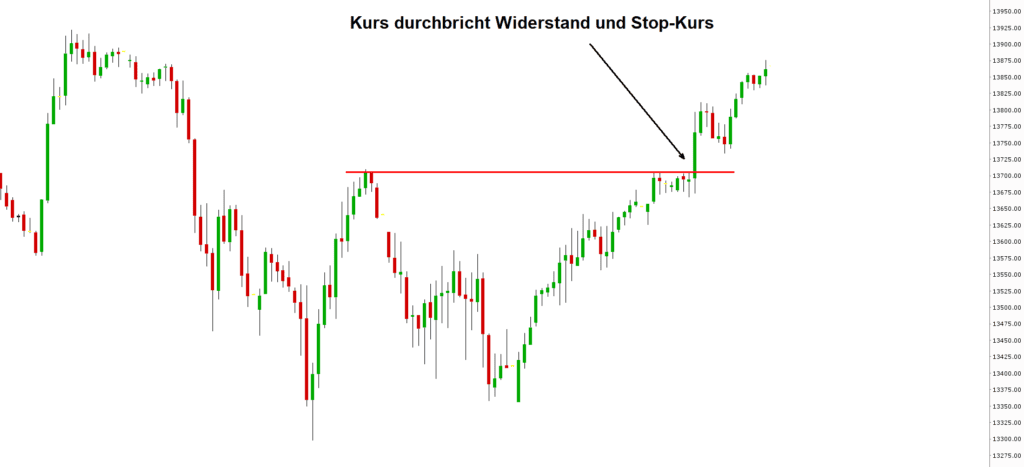
The buy stop order is executed immediately when the stop price is exceeded
Create Buy Stop Order in TWS and Trading App
To create a Buy Stop Order in the Trader Workstation or in the CapTrader Trading App, select a buy order and then change the order type to "STP" for a stop order. The detailed procedure is described in the Stop Order article.