


On the stock exchange, every investment and every trade is associated with risks of loss. In order to be among the winners in the long run, strict risk management is indispensable. The Stop Loss Order is one of the most commonly used tools to protect positions against uncontrollable risks and, in case of a loss, to limit it. In this article you will learn how a Stop Loss Order works and how to create it in Trader Workstation and CapTrader Trading App.
What is a Stop Loss Order?
A stop loss order is a stop order that is used to close a long or short position. As soon as a previously defined price level is exceeded or undershot, the buy or sell order is executed immediately at the next possible price. The stop order is converted into a market order when the stop price is reached.
Depending on whether you have a long position (purchase of a security or financial instrument) or a short position (short sale of a security or financial instrument), a buy order or a sell order is used as a stop loss order.

Stop Loss Order for a Long Position
If you have a long position and want to protect it from price losses, you must define a price at which you want to close the position if the underlying falls below this so-called stop price. I.e. you have to create a sell stop order and transmit the desired stop price. If the market falls below the stop price, the order is automatically converted into a market order and executed at the next possible price.
The stop price of the order can still be changed after the order has been transmitted. Thus, a stop loss order can also be used in order not to have to "give away" profits that have arisen in the case of a positive price development of the underlying.
Stop Loss Order for a Short Position
In the case of a short position or a short sale, a buy order must be submitted to close a position. I.e. you must create a buy stop order and transmit the desired price as the stop price, above which you would like to buy the underlying or end the trade. Here, too, the stop price can be adjusted or retightened at any time if your trade develops in your favor and you do not want to risk a loss in the event of a trend reversal and want to hedge profits.
Create Stop Loss Order in TWS and Trading App
To create a stop-loss order, you have the following options in the Trader Workstation and in the Trading app two possibilities:
You can submit a buy stop or sell stop order after opening a position regardless of the existing position (as described above). For example, if you own 100 shares in any company and the current share price is EUR 120, you can submit a sell stop order with a quantity of 100 and a stop price of EUR 100, for example, as a stop loss. As soon as the share price reaches or falls below the stop price, the sell order is executed and your 100 shares are sold at the best possible price. The exact procedure for creating a stop order is explained in the article Stop order.
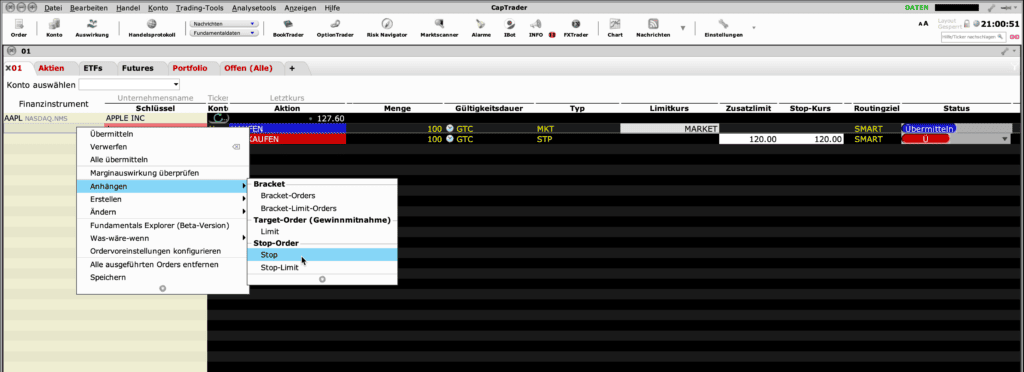
If you want to submit a stop loss order already with the position opening, you can right-click on the order in Trader Workstation and select a stop order in the menu that appears under "Attach".
To attach a stop loss order to an existing position, right-click on any icon in the Portfolio tab. In the menu that appears, select "Close" at the top. Now an order will appear in a new row, whose order type you still need to change to "STP". You also need to enter the desired stop price before clicking "Submit".
Stop order examples
As there are different types of stop orders, we will initially limit ourselves to a simple stop market order as an example:
You own 100 shares with a current market value of 20 euros per share. Unfortunately, things are not going well for the company and the shares have been on a downward trend for days. As you naturally don't want to make a loss, you want to sell your shares for at least 15 euros.
You create a stop market order to sell your 100 shares as soon as they reach a price of 15 euros. A few days later, the time has actually come: the company's shares have fallen to 15 euros.
Your stop market order is automatically triggered and converted into a market order for your broker. This means that your shares are sold immediately at the current best price. A potential buyer offers 14.90 euros per share. As this is the best price currently available, your broker sells the shares to this person. The 1,490 euros are credited to your securities account.