


The practical alternative, to manage your account
The IBot shows you how easy it is to trade, manage your account, and find information through TWS. Say or type queries in plain English and let the IBot create your transaction, show you your daily G&V, scan markets, create a custom chart, answer account questions, and display relevant articles. The IBot can search the IBKR website and access account management to assist you with deposits, transfers, and more. Link your productive account to Alexa for read-only access to account data.
Enter instructions using simple voice or text commands and the IBot will provide assistance as well as information on all matters. In addition to the TWS for desktop devices, IBKR Mobile and the Client Portal, we have expanded access to IBKR brokerage services and account information with more quick and easy alternatives, so that from now on the IBot can help you in more places than ever before:
Your account: Securely connected
Protecting your account information is our top priority. If you decide you no longer want your account connected to Alexa, you can simply disable the IBKR-IBot feature in the Alexa app.
- We keep your login information completely private and never share this information with Amazon.
- In doing so, we restrict the operation of the IBot to access your account via Alexa only in read-only mode.
- We recommend that you use the button to "mute" Alexa to avoid unintended commands.
Alexa, What is the price of Apple?
IBot, our interface for trading by natural voice input, allows you to easily access information without having to navigate through multiple pages to get an answer to your question. That's why we're excited to introduce the IBKR IBot feature for Amazon Alexa, which uses the powerful IBot to quickly and securely access content for both customers and non-customers. This is possible with any device that has Alexa: e.g. Amazon Echo, Echo Dot, Fire TV and the Fire TV Stick.
You can activate the function with a simple voice command: "Alexa, open IBKR." (Alexa, open IBKR.). Once activated, you can ask Alexa for the latest market updates, real-time quotes, general information about IBKR, and instructions. Just say:
Once you have an account with IBKR, you can access your account information through Alexa. Simply connect your productive account in the Skills section of the Alexa app by logging in with your IBKR username and password. Once your account is connected, you can ask the following:
Alexa responds with a clear and understandable answer directly from the IBot.

Use of the IBot
The IBot is powerful and at the same time simple and easy to use. It offers a groundbreaking new way to interact with your brokerage account, without a long learning curve. Since the IBot understands commands in plain English, you don't need to follow sentence structure rules or know specific keywords.
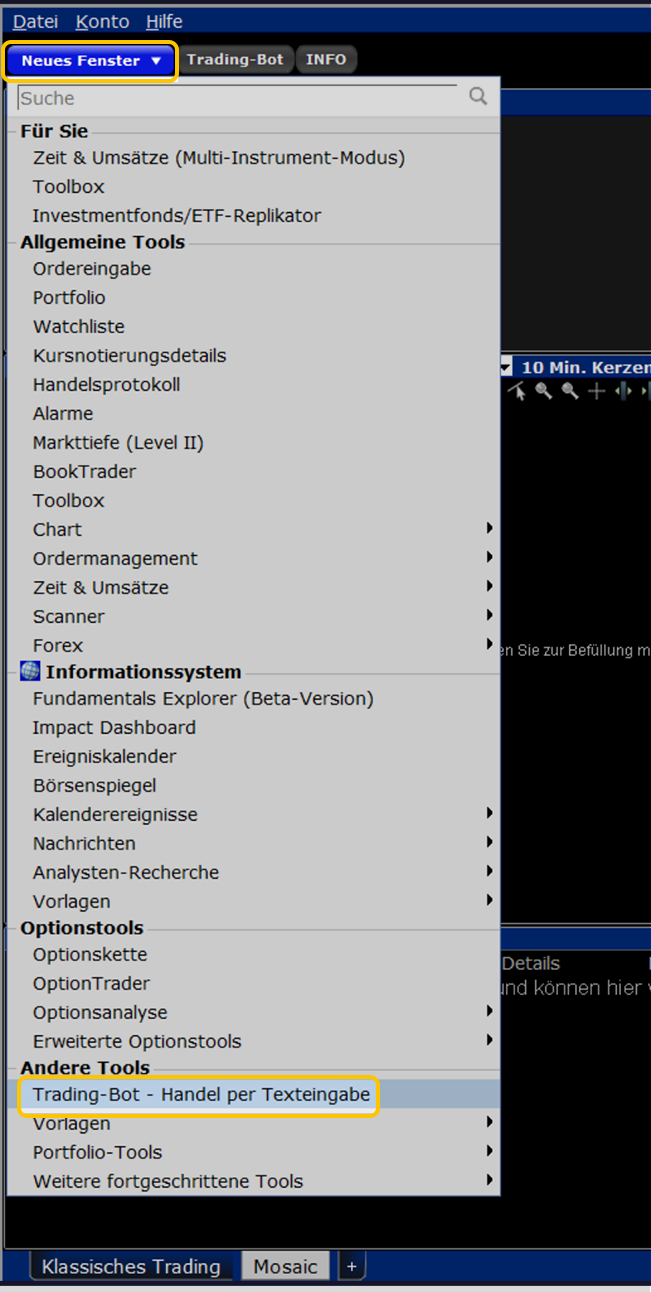
How do I open the IBot in the TWS?
In the "New window" drop-down menu in the Mosaic layout of TWS, click "IBot (Beta) - Trading via text input" under the "Trading" heading.
To open the IBot in the IB TWS for iOS
Log in to TWS for mobile devices on your iPhone. Tap the "More" icon in the tab bar at the bottom right of the app and select "IBot - Trade by text input".

Communicate with your platforms
The IBot is an application that combines multiple platforms into one and understands the same commands - regardless of whether you communicate with it from your desktop TWS, CapTrader App, Client Portal or any other platform through which the IBot is accessible.
Input from command
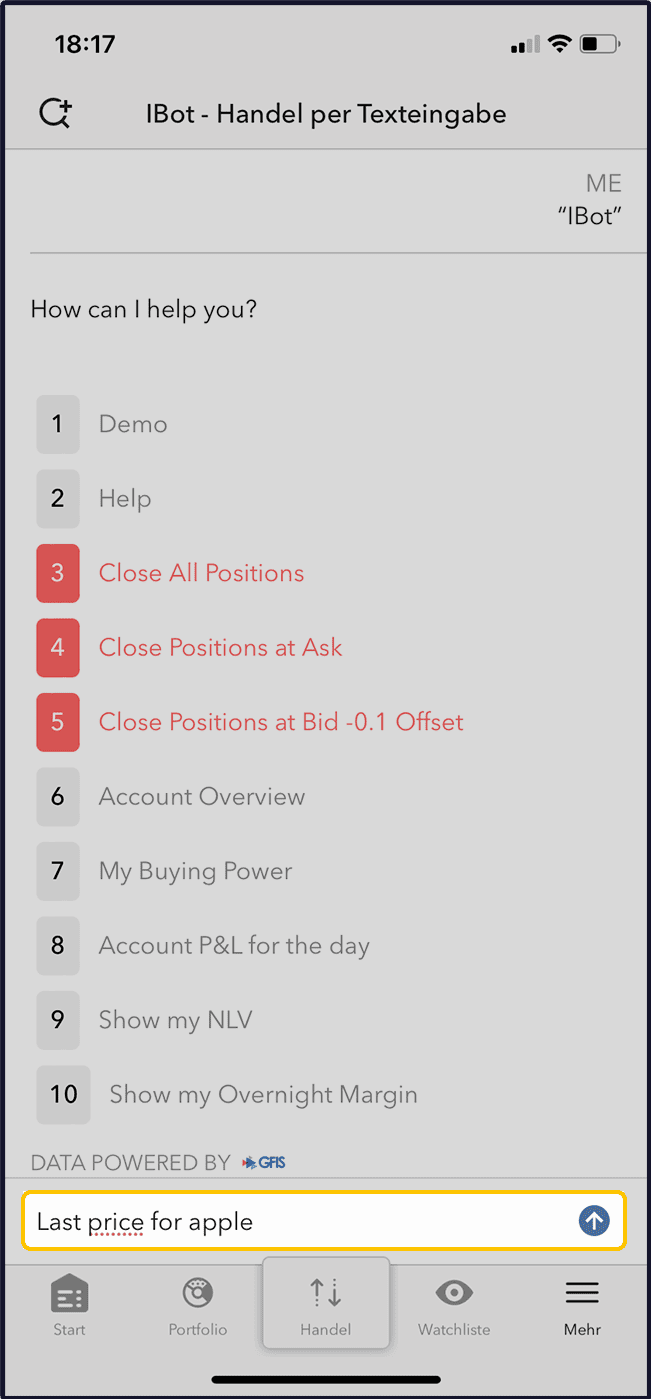
To start with a simple command, let's find out the current price of Apple stock.
Type your command in the input field of the IBot, such as: "show the price of apple" or "last price for apple" or "AAPL stock price". If you are using the CapTrader app, you can use the voice command feature by tapping the microphone icon and then tapping it again once you have finished speaking.
Creation of a Order
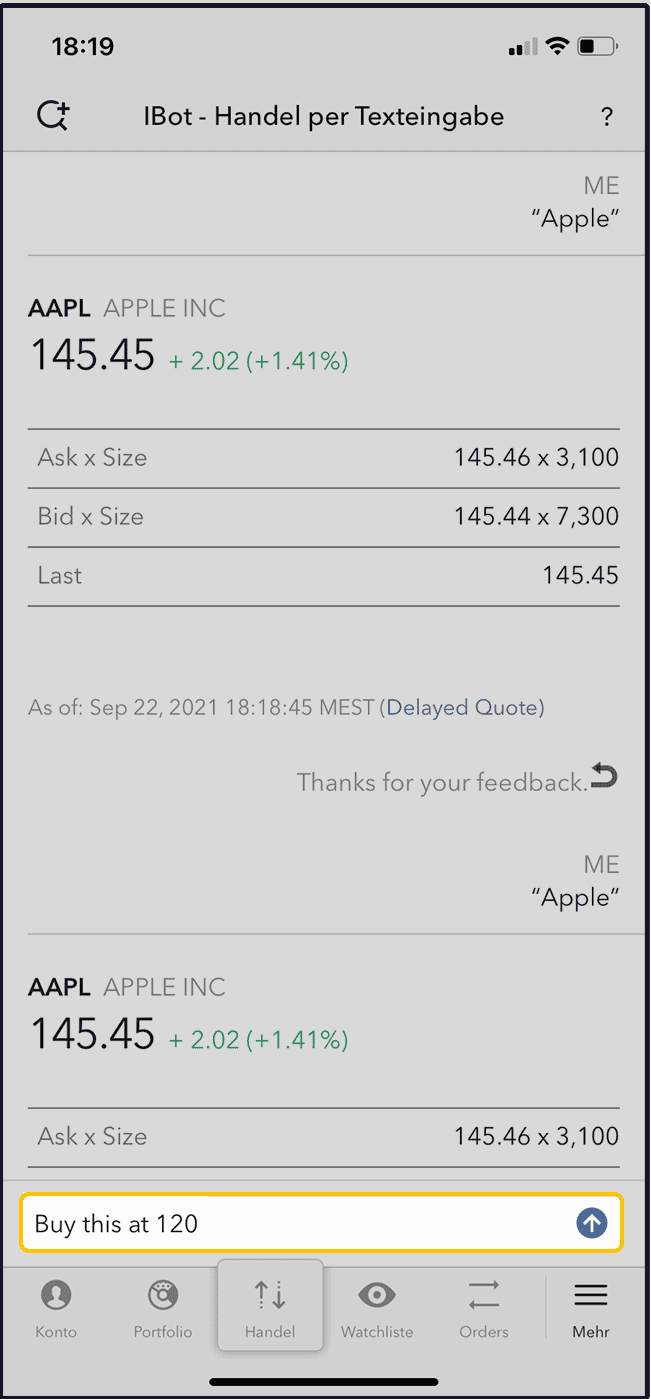
Now we go one step further and create an order. Therefore, in this case, you only need to give it the command "buy" (buy) or "sell" (sell). Thus, if you want to buy 100 shares of Apple at a limit price of $120.00, you just need to enter "buy this at 120". When the order is issued, you can simply check the order attributes and - if everything is correct - submit the order.
Please note that the order parameters are the same default settings that you see when you create an order from the order overview.

Open a custody account now and Use IBot
Through the SmartRouting function, you always buy and sell stocks at the best price and especially easily.
This is because the automatic order routing takes over the selection of the exchange that is favorable for you and sends your order to the trading venue with the lowest price.
Supported Commands & examples
The IBot can currently respond to commands from the following topic groups.
Price quotations
This command gets price information and fundamental data. For example, you can type "show nbbo IBKR" to get NBBO prices and volumes for the ticker IBKR. Alternatively, IBot can retrieve fundamental price data for you, such as price/book ratio, price to free cash flow ratio, or price/sales ratio.
Annual and upcoming dividend totals and dividend yields can also be accessed, as well as other fundamental data such as, among others:
- Quick ratio (2nd degree liquidity)
- Current ratio (3rd degree liquidity)
- Market Cap (market capitalization)
- Operating margin
- Payout ratio (dividend cover)
- Revenue
- Cash flow per share (Cash flow per share)
- Beta
- Free cash flow
- Total debt to total equity
- Earnings date (earnings announcement date)
- Return on equity
- Gross margin% (Gross margin %)
- Operating income
For information on how best to enter option contracts, see the appendix at the bottom of this page.
Charts
Tell the IBot the specific information you want to see. For example: "chart aapl over six months". If you don't specify the bar size or time period, the IBot will display the most reasonable chart based on your input. In this case, six months of weekly bars will be displayed. The IBot can easily configure these to daily bars by asking it to "use daily bars". Use the "next step" buttons to make it perform a task that would follow the previous one. Click "Open chart" to have the full chart displayed in a new TWS window.

iBot FAQ
To help you get answers in the shortest possible time, we recommend that you first consult the IBot FAQs. Our automated interface, which responds to natural voice commands, can quickly provide you with solutions to common problems and provide help guides to popular queries, such as balance management, bank transfers, Client Portal, sales overviews, account balances, order entry, and more. You can access IBot FAQs from the Client Services page (in the Contact Us menu) as well as from the IBKR search. When possible, the IBot FAQ feature will show you a direct link that will redirect you to your destination. Example: If you ask the IBot how to deposit funds into an account, the answer will include a link to the "Transfer Funds" section in Account Management. After that, click on this link and log in to the account management. You will then be redirected to the appropriate page to perform the task.
Market updates
Ask the IBot and it will provide you with the latest market updates, courtesy of Briefing.com. Simply say or type „What’s the latest market update” or „market brief” and the IBot will display the latest market briefing from Briefing.com, so you're always in the know about the latest happenings in the markets and never miss an update.
Orders
Place orders or close all or some of your open positions in a snap. For example, you can enter "buy 100 IBKR at 70" (buy 100 shares of IBKR at 70). The IBot will then show you a pre-filled order ticket, under which you can click the "Submit" button to place the order, or click the "Edit" button to make changes. Additionally, you have the option to cancel the order by selecting "Cancel". The IBot also understands commands like "close my BAC position" or "close 10% of my long positions".
Versions
You can ask for transactions, e.g. "Show trades on tsla". The IBot will then show you all recent trades on your desired ticker symbol. Use the "Next Step" buttons if needed. Click on "Open transactions" to have all transactions displayed in the Mosaic trading activity overview.
Market scanner
You can search the market for the most active US stocks by querying, for example, "top gaining US stocks" or "biggest US market winners". Enter the information query on the data you are interested in and let the market scanner display the top search results.
Level II Market Low Data
Market depth shows you bid and ask prices for a specific instrument from all available exchanges that are further away from the best current quote. For example, you can ask for "market depth for Tesla" or "show depth for tsla".
Option chains
View an options chain with multiple strike prices on an underlying financial instrument by querying "apple options" or "jan options for apple". The options chain will show you a list of all underlying prices at a maturity date, with the bid/ask price for calls on the left and the bid/ask price for puts on the right. Open the volatility chart using the "Next Step" buttons and click on "Open Option Chains" to have the whole tool displayed.
Event calendar
Display information about upcoming company and business events. Give the IBot the command "show portfolio events" or ask "upcoming events for portfolio companies". In the desktop variant of the IBot, events can be found for companies from your watchlist as well as for companies from your portfolio.
Your account
You can quickly find important account ratios in the TWS and in the account management using the IBot. For example, you can ask the IBot to "Show my P&L", or you can even specify a specific symbol to show your account or position P&L for the current day. Ask the IBot to show you key figures from PortfolioAnalyst and then you will be redirected to the account management.
Change commands
You can enter a command to modify an order or add further information to a chart. For example, if you are creating a limit order and then decide halfway through that you want to change the order type, you can simply type „change that order to market.“ The IBot will then update the order that is being created according to the new command data. If you mistakenly entered an incorrect price, you can ask the IBot to correct the price by typing „change limit price to...“.
Help
You can enter a command such as "Help with orders" or "Help with quotes" to get help on a specific function. If you want to get help information, you should always start your input with the word "Help". If you simply type "Help", help will be provided for that tool and you can view the IBot demo.
IMPORTANT: If you need help on a topic, start your input with the word "Help" to make sure the IBot understands instruction correctly. This is one of the cases where using a specific word in your commands is helpful.
Fundamental data on companies
If you want to see a summary of a company, just type a command like "Show summary for AAPL". The IBot will then show you a short summary of the most important data about the desired company.
Customer service information
At any time, you can enter a command such as "contact customer support" to receive a website link with Interactive Brokers customer service contact information.
Options
The IBot uses the following basic rules to decide which option contracts to show you:
Contract selection
In cases where more than one options contract with the same maturity date, strike price and right is available on the same exchange, the IBot shall select a contract based on the following criteria:
- Smart routed is preferred over non-smart routed
- Non-weekly contracts are preferred
- A contract with a standard multiplier is preferred
Partial compliance of an instrument
If you omit a parameter from your input, the IBot will attempt to identify the correct option contract using an educated guess based on the logic explained below. In these cases, the IBot will indicate to you that there may be a "Partial instrument match".
- If the base value is missing, the last used base value will be selected, if available.
- If the type is missing, a CALL is used as default.
- If the due date is missing, the next month will be selected.
- If the base price is missing, the base price is selected at the money.
Syntax for options
The IBot can recognize the following input formats as variants for the same option:
- SPY 105 call Sep’16
- SPY Sep16 105 CALL
- SPY 16Sep16 105 call
- SPY Q3 Sep16 105 call
- September 2016 SPY 105 call
- SPY expiring on 2016-09-16 105 call
- SPY Sep 16, 2016 105 call
- SPY SEP16 105C
- SPY Sep 16,2016 105C
- SPY September 105 Call
- SPY Q3 105C
- SPY Sep-16 105C
- SPY Sep16 16 105 call
- SPY September 105 Call
Variants for commands
Below you will find examples of variants of the command syntax that are currently supported by our IBot. The examples are sorted by category. Symbols and companies are used for illustrative purposes only.
Price quotation commands
Quote SPY dec,16 strike 200 (quote SPY Dec,16 strike 200)
Show 3 week chart for ES fut dec 2016 (Show 3 week chart for ES Fut Dec 2016)
What is the NBBO for SPY 105 Call Dec ’16
Show me bid of SPY Dec16 105 CALL (Show bid price of SPY Dec16 105 CALL)
What is last for SPY 16Dec16 105 call (What was the last price quote for SPY 16Dec16 105 call)
What is NBBO for SPY expiring on 2016-12-16 105 call.
I would like to know the bid, ask, and last for IBM CORP 1.25 Feb06’17.
Show me the trading hours for ES FOP (Show trading hours for ES FOP)
Last trading day of SPY 105 call Dec’16
What is the expiration date for CL FUT Oct’16 @NYMEX?
Tell me about AAPL (Information about AAPL)
Show me AAPL contract info (Show AAPL contract info)
Display contract description for IBKR (Display contract description for IBKR)
Show me fundamentals for AAPL (Show fundamental data for AAPL)
Business summary for AAPL (Show business summary for AAPL)
Print trading calendar for AAPL (Print trading calendar for AAPL)
Tell me bid size of MM2 @SWB (Show bid size of MM2 @SWB)
Show volume
View price (show price)
Price IBKR (Course IBKR)
AAPL cost of materials (AAPL Materialkosten)
AAPL cost of labor (AAPL personnel costs)
Show AAPL (Show AAPL)
BAC high price (BAC high price)
BAC low price (BAC Tiefstkurs)
BAC market cap (BAC market capitalization)
Show research for AAPL (Show research data for AAPL)
Show AAPL quotes 3 weeks ago (Show quotes for AAPL 3 weeks ago)
News MSFT (News about MSFT)
Show me price of AAPL@MEXI (Show price of AAPL@MEXI)
Quick Ratio for MSFT (Quick Ratio for MSFT)
Last AAPL (Last quotation AAPL)
What is mid of IBKR? (What is mid of IBKR?)
Inside Market AAPL
Gross Margin for MSFT (Gross Margin for MSFT)
Free Cash Flow for MSFT (Free Cash Flow to MSFT)
Free Cash Flow per share for MSFT (Free Cash Flow per share at MSFT)
Earnings before taxes for MSFT (Earnings before taxes of MSFT)
Return on Equity for MSFT (MSFT)
Total debt/total equity for MSFT
Beta for MSFT (Beta for MSFT)
Revenue for MSFT (MSFT sales)
Revenue per Employee for MSFT
Revenue/Employee for MSFT (Sales/Employee for MSFT)
Price to revenue for MSFT (MSFT price to revenue ratio)
Price 1 week percent change for MSFT (Percentage price change 1 week for MSFT)
Operating margin for MSFT (MSFT operating margin)
Current ratio for MSFT (Current ratio for MSFT)
Payout ratio for MSFT (dividend coverage of MSFT)
Earnings date for MSFT (Earnings announcement date of MSFT)
Receivables turnover for MSFT
Dividends for MSFT (Dividends for MSFT)
Dividend date for MSFT (Dividend date for MSFT)
Dividend yield for MSFT (Dividend income for MSFT)
Earnings per share for MSFT
Show PE ratio for MSFT (Show PE ratio for MSFT)
Operating income for MSFT (Operating income from MSFT)
Net income available to common for MSFT (net income attributable to common shareholders of MSFT)
Total current assets for MSFT
Total current liabilities for MSFT
Revenue change for MSFT (MSFT revenue change)
Return on investment for MSFT (MSFT's return on investment)
Financing cash flow items for MSFT (Cash flow items from financing for MSFT)
Earnings/share change for MSFT (Change in earnings/share of MSFT)
Cash from operating activities for MSFT
Book value per share for MSFT (Book value per share for MSFT)
Pretax margin for MSFT (pre-tax margin for MSFT)
Return on average assets for MSFT
Revenue per share for MSFT (Sales per share of MSFT)
Price 52 week high for MSFT (52-week high price of MSFT)
Price 52-week low for MSFT (52-week low price of MSFT)
Average volume MSFT (Average volume MSFT)
Show me upcoming dividends (Show upcoming dividends)
Commands to charts
Chart for US-T BILL Jan26’17 for 1 week with hourly bars
Show me price chart for SPY Sep-16 105C (Show price chart for SPY Sep-16 105C)
Plot short term chart for junior index (Draw short term chart for junior index)
Plot midpoint chart for SPY Sep16 16 105 call (Chart at midpoint price for SPY Sep16 16 105 call)
Price chart for SPY September $105 Call with midpoint (Price chart for SPY September $105 Call with midpoint)
History of AAPL (History of AAPL)
Chart AAPL
Show me 2 days price of AAPL (Show 2 days prices of AAPL)
Chart MSFT over 5 days (Chart of MSFT for 5 days)
Open chart for IBKR (Open chart for IBKR)
Chart on IBKR (Chart on IBKR)
Draw AAPL 2 years 1 week bar chart (AAPL 2 years chart with 1 week bar)
Give me 5 minute bar chart of IBKR (Chart with 5 minute bar to IBKR)
Show AAPL ytd line chart (Show AAPL YTD line chart)
Plot AAPL 5 days 10 mins bar chart (AAPL 5 days 10 mins bar chart)
Long term chart for usd.jpy (Long term chart for usd.jpy)
Plot AAPL year chart 10 mins candles
Plot TTM chart of IBKR (Plot TTM chart for IBKR)
Plot YTD chart of IBKR (Plot YTD chart for IBKR)
3 months historical volatility chart AAPL (3 months historical volatility chart of AAPL)
Price chart for AAPL with rebate rate and midpoint
Year option implied volatility chart for AAPL with fee rate
Chart AAPL vs MSFT
Transaction commands
Show all of my filled orders (Show all my filled orders)
Show all of my active orders (Show all my active orders)
Show all of my unfilled orders (Show all my unfilled orders)
Show all of my completed orders (Show all my completed orders)
Show canceled orders (Show canceled orders)
Show my open orders (Show my open orders)
Show working orders (Show active orders)
Show working orders for computer companies (Show active orders for computer company values)
Show IBKR orders (Show IBKR orders)
Show working orders for TWTR and IBKR (Show active orders for TWTR and IBKR)
Show all orders that filled on NYSE (Show all orders filled on NYSE)
List bond orders (listing of bond orders)
Display trades (Show transactions)
Show my trades for last week (Show my trades for last week)
Show yesterday's trades (Show my transactions from yesterday)
Show all yesterday's trades filled on CPH (Show my trades executed yesterday on CPH)
Show trades for IBKR (Show transactions with IBKR)
Show trades for TWTR and IBKR (Show transactions for TWTR and IBKR)
Last 5 days trades filled on SEHK (transactions of the last 5 days with execution on SEHK)
Trades filled on SGX and BM (transactions with execution on SGX and BM)
Trades for STK (transactions on shares)
Stock trades filled on HEX or OSE (Stock transactions executed on HEX or OSE)
All Futures trades (All transactions with futures)
Trades for past 4 days (executions of the last 4 days)
Show my Monday trades (Show my Monday trades)
Show my Tuesday trades filled on ISLAND (Show my Tuesday trades filled on ISLAND)
List Wednesday trades for futures (List of Wednesday futures transactions)
Orders commands
I want to buy University of California 4.75 May15’22
Buy BUF@FWB (Buy BUF@FWB)
Place an order for December 2016 SPY 105 call (Place an order for December 2016 SPY 105 call)
Buy 2 of SPY Dec 16, 2016 105 call at mkt (Buy 2 contracts SPY Dec 16, 2016 105 call at mkt)
Buy 2 of GC Oct 27, 2016 @NYMEX (Buy 2 contracts of GC Oct 27, 2016 @NYMEX)
Buy 3 of SPY DEC16 105C at ask (Buy 3 contracts of SPY DEC16 105C at ask price)
Buy ZC May 26,2017 285 call at bid (Buy ZC May 26,2017 285 call at bid price)
Buy 5 of SPY September 105 Call at 106 (Buy 5 contracts of SPY September 105 Call at 106)
Buy 500 of SEL at 100 (Buy 500 of SEL at 100)
Buy 1000 AAPL )Buy 1000 AAPL)
Place an order for IBKR (Place an order for IBKR)
Buy 100k of EUR.USD (Buy EUR.USD for 100k)
Buy 1000$ worth IBKR at market (Buy IBKR for 1000$ at market rate)
Buy 300 shares of MSFT at ask (Buy 300 shares of MSFT at ask price)
Buy 100 shares of IBKR at 40.95 (Buy 100 shares of IBKR at 40.95)
Buy 20 shares of that at market - usable if you have previously requested a quote or chart for a specific symbol
Buy additionally 100 of it at 40.0 (Buy additionally 100 of it for 40.0)
Short IBKR (short sale of IBKR)
Sell 300 IBKR@mkt (Sell 300 IBKR@mkt)
Sell 400 IBKR@last (Sell 400 IBKR@last)
Buy 100 shares of AAPL on market open (Buy 100 shares of AAPL at the start of trading)
sell 100 IBKR shares at GTC (sale of 100 shares of IBKR as GTC)
Buy 200 lots of AAPL loo (Buy 200 lots of AAPL per LOO)
Buy 200 AAPL at moo (Buy 200 AAPL per MOO)
Aell 300 shares of IBKR at limit on close (sale of 300 shares of IBKR per limit-on-close)
Sell 1 lot (sale of 1 lot)
Buy 300 more shares (purchase of 300 more shares)
Market scanner commands
US stocks top % gainers (winners/losers) (US Aktien – prozentuale Top-Aufsteiger/Gewinner/Verlierer)
US STK top % gainers (winners/losers)
Top gaining (winning/losing/increasing/decreasing) US stocks (highest risers/gainers/losers/risers/decreasers in US stocks)
US stock top gainers (winners/losers) in price (US stock top gainers/losers by price)
Most advanced (declining) US stk (Strongest rise/decline in US equities)
Top risers (losers) of US stocks
US stocks price % winners (losers) (proc. winners/losers in US stock prices)
US STK price percentage leaders (losers) (leaders/losers by percentage of price value in US stocks)
Top percentage gainers (winners/losers) for US stk (Percentage of top gainers/winners/losers in US equities)
Biggest percentage winners (gainers/losers) of US stocks
US Stocks Biggest Percent Winners (Gainers/Losers)
US stocks with biggest price increases (decreases)
Top percent gainers (winners/losers) on US stock market (percent top gainers/losers on US stock market)
Scan US stocks for top % gainers (winners/losers) (Scan US stocks for top percentage gainers/losers)
Top gainers (winners/losers) in US stocks by percentage
US Stocks - Top Percentage Gainers (Winners/Losers)
Most up (down) US stocks (US stocks with strongest increase/decrease)
Top US stock market gainers (winners/losers)
Biggest US market winners (gainers/losers)
US biggest percentage winners (gainers/losers)
Find top US gainers (winners/losers) (Find strongest US gainers/winners/losers)
US Stocks with highest percent gain (loss)
Highest gainers (winners/losers) for US stocks
Greatest percent gains (losses) US stocks (Greatest percent gain/loss in US stocks)
NYSE top % gainers (losers) US STK (Percent top gainers/losers in US stocks on NYSE)
Top risers (losers) of US stocks on NYSE (Top risers/losers of US stocks on NYSE)
NYSE price % winners (gainers) US stocks (NYSE price proz. winners/losers in US stocks)
Price percentage gainers (winners/losers) of US stocks on NYSE exchange (winners/losers/climbers by percentage of price value of US stocks on NYSE exchange)
Top percentage gainers (winners/losers) for US stk in NYSE (Percentage top gainers/winners/losers for US stk in NYSE)
Biggest percentage winners (gainers/losers) of US stocks at NYSE ((Biggest percentage gainers/losers of US stocks at NYSE)
NYSE biggest percent winners (gainers/losers) US stocks (NYSE biggest percent gainers/losers in US stocks)
US stocks with biggest price increases (decreases) on NYSE (US stocks with biggest price increases/decreases on NYSE)
Worst losers of US stocks (strongest losers in US stocks)
US stock losers (losers US stocks)
Lowest gains for US stocks (Lowest increase for US stocks)
Greatest percent loss (gain) for US stocks
Highest percent loss (gain) for US stocks
NYSE US STK top % losers (gainers) (NYSE US stocks proz. top gainers/losers)
Hot stocks that are moving US stock market
Hot stocks trading today on US market
Stock market movers in US (Driving forces in the US stock market)
Big movers among US stocks (strongest drivers among US stocks)
US market hot stocks today (US market attractive stocks today)
US hot stocks today (Attractive US stocks today)
most heavily traded us stocks (Most heavily traded US stocks)
top volume active us stocks (largest volume of active US stocks)
most traded US stocks today
most active US stocks today
most active US stocks by volume
most traded US stocks by volume
show me us stocks with the most active trading (show stocks with the most active trading)
Highest (Least) traded US stocks
Top US stocks (Top US stocks)
US stock winners (losers) (winners/losers in US stocks)
high (low) volume traded us shares (US shares with highest/lowest volume traded)
US stocks with highest (lowest) trading volume
US stk volume leaders (top US stock volume)
rank US stocks by highest (lowest) daily volume (sort US stocks by highest/smallest daily volume)
scan US stocks for the greatest daily volume (Search for US stocks with the greatest daily volume)
show US stocks with largest (smallest) trade volume (show US stocks with largest/smallest trade volume)
most active US stocks by dollar volume (Most active US stocks by dollar volume)
top $ volume US STK (top $ volume in US stocks)
high $ vol US stk (Highest 4 vol US shares)
$ volume leaders of us stocks (US stocks leading by $ volume)
US stocks not yet traded today (US stocks not yet traded today)
US stocks no deals today (US stocks with no deals so far today)
US STK not yet transacted (US shares without transactions today)
not opened US stocks (US stocks not opened)
US Stocks with no trades today (US stocks with no executions today)
US stocks not traded today (US stocks not yet traded today)
Show halted us stocks (Show suspended US stocks)
display stocks which are halted in US (display stocks whose trading has been suspended in the US)
US STK trading halts (US stocks with trading halt)
Show trading pause US stocks (Show trading pause US stocks)
Show Trading halt US stocks (Show trading stops on US stocks)
Today's Halted Stocks
Hot stocks by price (volume) in US (Attractive stocks by price/volume in the US today)
US market hot stocks by price (volume) (US market attractive stocks by price/volume)
Hottest US stocks by price (volume) (Most attractive US stocks by price/volume)
Hottest by price (volume) (Most attractive by price/volume)
US stocks having high dividend yield (US stocks with high dividend yield)
highest yield dividend US stocks (Highest yield dividend US stocks)
US stocks with highest dividend per share yield
Top trade rate US stocks (Top execution rate US stocks)
Hot by price range us stocks (Most attractive US stocks by price range)
US stocks with the largest volume/minute amount
High 3 minute volume US stocks
Top % gainers since open for US stocks (Percentage of top gainers in US stocks since open)
US stocks top close to open % losers (Highest percent losers from close to open in US stocks)
Show US stocks with the lowest close to open percent gap (US stocks with the lowest close to open percent gap)
Highest Option Imp Vol US stocks (Highest impl. vol. of options on US stocks)
US stocks with the highest option implied volatility percent (US stocks with highest percent implied option volatility)
Lowest Option Imp Vol US stocks (stocks with lowest impl. vol. of options)
US stocks with the lowest option implied volatility percent (US stocks with lowest percent implied option volatility)
Top Option Imp Vol % Gainers among US stocks (top gainers among US stocks by proc. impl. option volatility)
US stocks with the largest percent gain in option implied volatility
US stocks with the highest option implied volatility change
US stocks with the lowest option implied volatility change
High Option Imp Vol Over Historical for US stocks (US stocks with high impl. option volatility relative to historical volatility)
US stocks with the highest ratio of the implied volatility over the historical in percentage (US stocks with the highest ratio of implied volatility to historical volatility in percentage)
hottest buy side imbalance US stk (Most attractive US stocks by imbalance on the buy side)
Hot by Sell Imbalance US stocks (Most attractive US stocks by imbalance on the sell side)
US stocks with the highest sell-side imbalance
hottest sell side imbalance US stk (most attractive US stocks by sell side imbalance)
Hot by Buy Regulatory Imbalance US stocks (Most attractive US stocks by regulatory imbalance on the buy side)
US stocks with the highest buy-side regulatory imbalance
US stocks 52-week high (US stocks 52-week high)
52 week high among US STK (52-week high among US stocks)
US stocks Upcoming IPO date (Upcoming IPO dates for US stocks)
upcoming initial public offering date for US stocks
High Growth Rate of US stocks
US stocks with the highest EPS growth rate
US stocks with the highest Earnings Per Share growth rate
Low Growth Rate of US stocks
US stocks with the lowest EPS growth rate
US stocks with the lowest Earnings Per Share growth rate
High P/E ratio of US stocks (Highest P/E ratio of US stocks)
US stocks with the highest Price to Earnings ratio (US stocks with highest P/E ratio)
Low P/E Ratio of US stocks (Lowest P/E ratio of US stocks)
Low Price/Book Ratio of US stocks
Low price to book ratio of us stocks (Lowest price to book ratio of US stocks)
US stocks with the lowest price-to-book ratio
High Price/Tang. (Highest price-to-tangible book ratio) Book ratio of US stocks (Highest price-to-mat. book value ratio of US stocks).
US stocks with high price to tangible book ratio (US stocks with highest price rel. to mat. book value)
US stocks with the highest price-to-tangible book ratio
Low Price/Tang. (Lowest price-to-tangible book ratio) Book ratio of US stocks (Highest price-to-mat. book value ratio of US stocks).
US stocks with low price to tangible book ratio (US stocks with lowest price relative to mat. book value)
US stocks with the lowest price-to-tangible book ratio
Upcoming major event of US stocks (Upcoming major events of US stocks)
US stocks with high fee rate
US stocks with low fee rate
US stocks with high rebate rate
US stocks with low rebate rate
Show me top options in US (Show top options in the USA)
Show most active US options
top $ volume US OPT (Top $ volume at US OPT)
high $ vol US opt (high $ vol. at US opt)
dollar volume traded top US options (dollar volume of the most traded US options)
US options by dollar trading volume
US futures top % gainers (US futures proc. top risers)
US FUT top % gainers (US FUT proc. top gainers)
us futures price % winners (losers) (US futures prices proz. winners/losers)
US FUT price percentage leaders (US FUT top leaders by percentage of price value)
top percentage gainers (losers) for us fut (percent top gainers/losers) for US fut.)
Show most active US FUT (Show most active US FUT)
display most active by volume US fut (Display most active US fut. by volume)
Show halted us futures (Show suspended US futures)
most heavily traded us futures on globex (Most heavily traded US futures on Globex)
NYMEX most active US futures
US indices top % losers (US indices biggest proc. losers)
price % decliners of US indices (losers by percentage of price value in US indices)
US indexes top % losers (US indexes highest proc. losers)
America non-US stocks top % gainers (losers) (Top proc. gainers/losers in American stocks excl. USA)
Top American stock movers outside US (Drivers of American stocks outside US)
EU FUT price percentage leaders (losers) (EU FUT leaders/losers by percentage of the price value)
Europe indices top % gainers (losers) (Largest percent climbers/losers in European indices)
EU IND top % gainers (losers) (Largest proc. gainers/losers)
Most advanced European indexes (Most advanced European indexes)
Top risers (losers/decliners) of Europe's indexes
Europe indexes price % winners (losers)
Scan EU indices for top % losers (winners/gainers) (Scan EU indices for top losers/gainers/gainers by percentage of price value)
Europe indexes top % losers (Biggest percent losers in European indexes)
Asia stocks top gainers in price (top gainers by price in Asian stocks)
Most advanced (declining) Asian stocks (Most advanced/declining Asian stocks)
Show most active Asian stocks
Top Asia stocks by dollar volume (Leading Asian stocks by dollar volume)
Asian stocks with highest dollar-volume
Trading halts of Asian STK (Trading halts of Asian stocks)
Flops (losers/winners) today (Flops/losers/winners today)
What's the best short for today?
What are the highest volume etfs today (Which ETFs have the highest volume today)
active ibm bonds (active IBM bonds)
Show us stocks with largest change (Show US stocks with largest change)
Level II market depth commands
Show market depth for this – Usable after another command for a specific contract
Show depth for this - Usable after another command for a specific contract
aapl book (AAPL order book)
apple book (Apple order book)
aapl level II book (aapl level II order book)
aapl depth (aapl depth)
aapl level2 data (aapl level 2 data)
get aapl level ii data (Display level ii data for aapl)
show aapl depth (show aapl depth)
aapl level ii order book (aapl level ii order book)
Level 2 market data for AAPL (Level 2 market data for aapl)
Show level 2 quotes for AAPL (Show level 2 quotes for aapl)
Show AAPL order book (Show AAPL order book)
AAPL Level II
AAPL deep book (AAPL Bay Depth)
Level II for AAPL
Deep book quote for AAPL (Book depth quotes for AAPL)
BP. Depth
ibkr depth (ibkr depth)
EUR.USD depth (EUR.USD depth)
bmw depth (bmw depth)
ibkr depth for bats(depth ibkr at bats)
show IBKR level 2 data in BATS (Show IBKR level 2 at BATS)
Show NYSE order book for IBKR (Show NYSE order book for IBKR)
Show NYSE market depth for IBKR (Show NYSE market depth for IBKR)
show depth NYSE IBKR (Show depth NYSE IBKR)
show level 2 data IBKR NYSE (Show level 2 data IBKR NYSE)
IBKR deep book NYSE (IBKR Bay depth NYSE)
NYSE Level II IBKR
NYSE depth for IBKR (NYSE depth for IBKR)
ibkr depth for bats, lse, nyse (ibkr depth for bats, lse, nyse)
level 2 quotes msft and intc (level 2 quotes on msft and intc)
Show the order book for microsoft and intc (Show order book for Microsoft and INTC)
Option chain commands
flo options (FLO options)
flo option chain (FLO option chain)
option chain for flo (option chain for FLO)
option chain for oil on nymex (option chain for oil on NYMEX)
option chain for clz7 (option chain for clz7)
option chain for dec17 heating oil
option chain for heating oil Dec17 (option chain for heating oil Dec17)
all December 17 heating oil options
all December heating oil options
all 12/17 heating oil options
all 12-17 heating oil options
ibkr option chain (ibkr option chain)
aapl (apple) option chain (aapl/Apple option chain)
options AAPL (apple) (Options on AAPL/Apple)
AAPL all option strike prices
AAPL option strike prices (AAPL option strike prices)
option quotes AAPL (Option quotes AAPL)
all aapl strikes (All aapl strikes)
all options for aapl (All options for aapl)
AAPL option chain for expiries Jan’17, Feb’17 and Mar’17 strikes 90 100 and 110
aapl option chain with strikes from 90 100 and 110 and expiring Jan’17 Feb’17 and Mar’17
AAPL option chain Jan – Mar 17 for strikes 90 100 110
AAPL options 90 100 110 for Jan–Mar 17 expiry
AAPL options 90 100 110 expiring Jan – Mar 17
AAPL options Jan-March with 90-110 strikes (AAPL options Jan-March with strike price 90-110)
AAPL options for Jan, Feb, March with strikes 90 – 110
Option chains for AAPL jan-march with 90, 100 and 110 strikes (Option chains for AAPL jan-march with strike prices 90, 100 and 110)
IBM option chain for expiries Jan’17, Feb’17 and Mar’17 strikes 155 to 165
aapl option chain with strikes from 100 to 120 (aapl option chain with strike prices from 100 to 120)
show AAPL options 100 to 120 (Show AAPL options 100 to 120)
Show AAPL option strikes 100 – 120
AAPL options 100 to 120 (AAPL options 100 to 120)
AAPL option chain for strikes 100 to 120 (AAPL option chain for strike prices 100 to 120)
AAPL strikes 100 to 120 (AAPL base prices 100 to 120)
From 100-120 strikes for AAPL (base prices from 100-120 AAPL)
Calendar/Event Commands
show economic events
earnings for aapl (earnings for AAPL)
show event calendars (Show event calendars)
show events for next week (show events for next week)
display calendar for portfolio, watchlist, recently held and competitor companies (display calendar for portfolio and watchlist companies, recently held companies and competitor companies)
display calendar for ibkr (Show calendar for ibkr)
IBKR events calendar (IBKR events calendar)
event calendars for Interactive Brokers (Event calendars for Interactive Brokers)
Show event calendars for ibkr ticker (Event calendars for ibkr ticker)
display next scheduled event for ibkr (show next scheduled event for ibkr)
What is the next most important event for ibkr?
What is the next most important calendar event for ibkr?
show me ibkr events (show ibkr events)
show events for my portfolio (Show events for my portfolio)
my portfolio events (my portfolio events)
show event calendar for US (Show event calendar for USA)
United States event calendars (United States event calendars)
USA calendar of events (USA events calendar)
Display upcoming calendar events in US (Show upcoming calendar events in the USA)
show US events calendar for 12/26/2016
show event calendar for EU (Show event calendar for EU)
Display Europe's events calendar
European calendar of events (European calendar of events)
display upcoming calendar events in Europe
show event calendar for America non-US region
America non US events calendar (Events calendar America without USA)
american outside US event calendars (Event calendars America outside USA)
show event calendar for Asia (Show event calendar for Asia)
Asian events calendar (Asian events calendar)
Asia's event calendar
display corporate earnings
Show corporate earnings calendar (Show corporate earnings calendar)
Show event calendar for earnings (Show event calendar for earnings figures)
Company earnings announcements
Earnings announced by companies
Display earnings reports
schedule of corporate earnings (overview of corporate results)
corporate earnings preview (preview of company results)
corporate earnings lineup (listing of corporate results)
When is sbux earnings (When is the announcement of the results of sbux)
When is sbux earnings date (When is the earnings date of sbux)
When will sbux earnings be announced? (When will sbux announce earnings?)
when does sbux report earnings (When does sbux report earnings)
Announcement of results for sbux
sbux earnings calendar (sbux results calendar)
Show corporate earnings from 12/08/2016 until 1/10/2017 (Show corporate earnings from 12/08/2016 to 1/10/2017)
Show dividends calendar (Show dividend calendar)
Display dividend payment dates (Display dividend payment dates)
Show dividends schedule (Show dividend schedule)
List of upcoming dividend dates
dividends timetable (dividend schedule)
Dividends payout dates (Dividends payout dates)
When is the next dividend payable date for oracle
When is the ex. dividend date for oracle? (When is the ex date for Oracle?)
get ORCL dividend calendars (Open ORCL dividend calendars)
Upcoming IPOs (Upcoming IPOs)
Secondary public offerings (secondary offerings)
SPOs calendar (Calendar for SPOs)
Initial & secondary offerings (first and second placements)
Upcoming secondary offering in europe
show next month secondary offerings (show secondary offerings next month)
stock split calendar (calendar for stock splits)
calendar of stocks splits for AAPL (Calendar of stock splits for AAPL)
AAPL stock splits (AAPL stock splits)
shares splits dates of AAPL (dates for stock splits of AAPL)
AAPL upcoming stock splits (AAPL upcoming stock splits)
stock splitting for AAPL (splitting of shares at AAPL)
US stock splits calendar (Calendar on US stock splits)
upcoming stocks splits in US (Upcoming stock splits in the USA)
United States stock splits (United States stock splits)
EU stock splits calendar (Calendar on EU stock splits)
Europe's Stock Splitting
European stocks splits schedule (Overview of European stock splits)
corporate events (corporate events)
corporate event calendar
calendar of corporate events (calendar of corporate events)
upcoming corporate events (Upcoming corporate events)
schedule of corporate events (overview of corporate events)
corporate events timetable (corporate events timetable)
BAC corporate events (BAC Corporate Events)
economic events
economic event calendar
calendar of economic events (calendar of economic events)
upcoming economic events (Upcoming economic events)
US economic events (US economic events)
economic event calendar in United States (economic event calendar United States)
discover economic events in US (Find economic events in the USA)
show calendar with economic events in europe (Show calendar with economic events in europe)
option last trade dates (Last trade dates of options)
last trading days of options (Last trading days of options)
option last trade dates for SPY (Last trade dates of options on SPY)
weekly option last trade dates (weekly last trade dates of options)
show dividend calendar for companies in my portfolio (show dividend calendar for companies in my portfolio)
show earnings dates for companies in my portfolio (Show earnings dates for companies in my portfolio)
Are there any splits and corporate events for sbux? (Are there any upcoming stock splits or corporate events for sbux?)
Commands for closing positions
Close AGFS position (Close position for AGFS)
Close AAPL position at market (Close position for AAPL at market price)
Close 10 percent of AAPL position (Close 10 percent of position for AAPL)
Close 23 percent of short stocks (close 23 percent of short positions for stocks)
Close positions at market (close positions at market price)
Close positions at ask (close positions at the ask price)
Close all positions (Close all positions)
Sell everything
Sell everything at bid (Sell everything at the bid price)
Close my position in IBKR (Close my position for IBKR)
Sell all of my IBKR stock (Sell all of my shares of IBKR)
Increase IBKR position by 50% (Increase my position for IBKR by 50%)
Decrease IBKR position by 30 (Decrease my position for IBKR by 30)
Sell 60% of my IBKR (Sell 60% of my IBKR)
Sell 60% of position in this (60% of the position in this) - usable when you have previously viewed a specific symbol in a chart, as a price quote, or in an order
Sell 100 of my IBKR (Sell 100 of my IBKR)
Close short positions (Close my short positions)
Close my stock positions (Close my stock positions)
Close all at market using GTC time in force (Close all at market price with validity period GTC)
Close positions at ask with 0.2 offset (Close positions at ask with 0.2 offset)
Close positions at bid with -0.1 offset (Close positions at bid with -0.1 offset)
Commands to your account
How much money I can withdraw? (How much money can I withdraw?)
How much money do I have? (How much money do I have?)
Available funds
Cash balance
What is my buying power? (What is my buying power?)
Show my account summary (Show my account summary)
Show me my account
Daily P&L for IBKR (Daily P&L for IBKR)
Unrealized P&L for IBKR (Unrealized P&L for IBKR)
Realized P&L for IBKR (Realized P&L for IBKR)
Display P&L (Display G&V)
Current P&L (Current P&L)
What is my NLV? (What is my NLV?)
What's my overnight margin?
Buying power and margin
MORE THAN 1.2 MILLION VALUE PAPERS AT SENSATIONAL CONDITIONS

Stocks

Options

Futures

Forex

ETFs

Warrants

Bonds
