


The Sell Stop Order (also: Stop Sell Order) is a type of order that is used to sell any underlying at a previously defined price as soon as it falls below the stop price. This can be done to open a short position or to hedge an existing long position if it falls below a certain price level. (The latter is called a stop loss order.) The sell stop order is usually used when the underlying is to be sold in any case when the stop price is reached, even accepting a possibly worse actual execution price (slippage). In this article you will learn what a sell stop order is, how it works and when its use makes sense.
What is a Sell Stop Order?
With a sell stop order, the broker is given the order to sell a financial instrument as soon as a previously defined price is reached or undershot. When the stop price is reached, the sell stop order is converted into a market order, i.e. execution takes place immediately at the next possible tradable price. The actual execution price may therefore differ from the previously defined stop price.
Example: Sell Stop Order Boeing Share
The following example illustrates the functionality and a possible purpose of a Sell Stop Order:
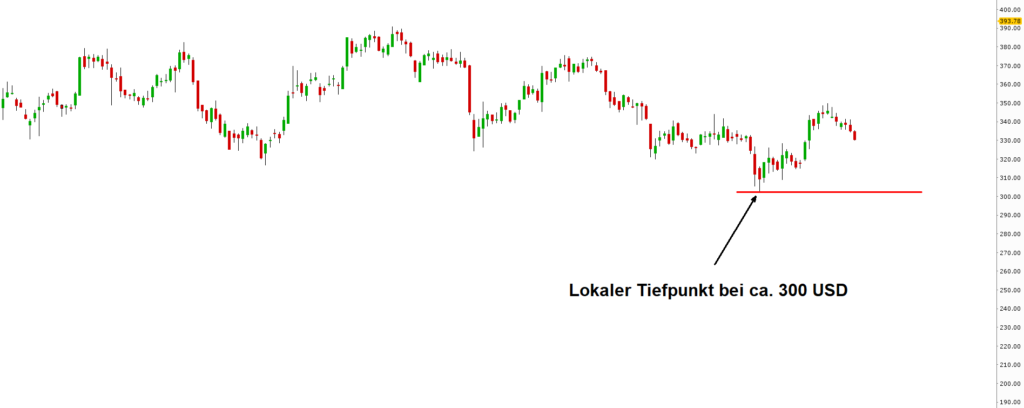
Boeing shares formed a local low at the beginning of 2020 at around USD 300 per share. Chartists or market technicians would expect a continuation of the downward trend if the share price falls below the low.
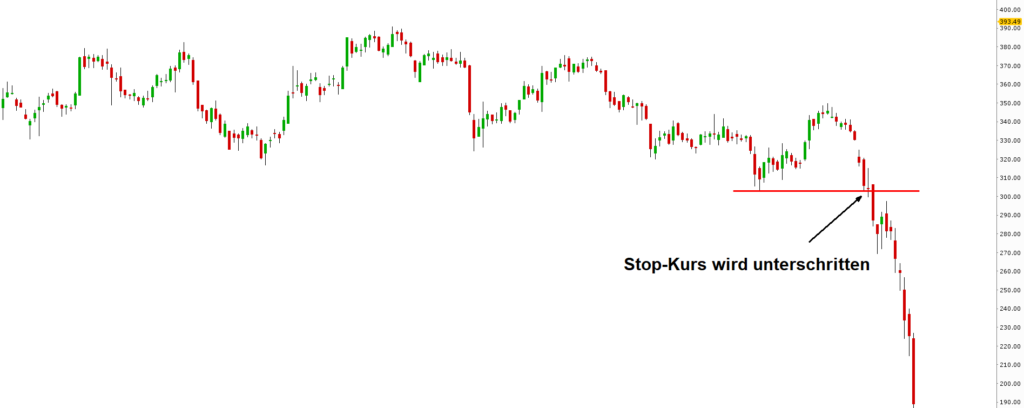
If you had Boeing shares in your portfolio at the time shown in the following chart, you could have created a Sell Stop Order in the area of 300 USD to protect yourself from further losses when the local low is undershot. As a speculative trader, you could also have used the sell stop order to open a short position.
As soon as the price falls below the stop price, the sell stop order is automatically converted into a market order and executed at the next possible price.
Create Sell Stop Order in TWS and Trading App
To create a sell stop order in the Trader Workstation or in the CapTrader Trading App, select a sell order and then change the order type to "STP" for a stop order. The detailed procedure is described in the article Stop Loss Order described.