


For custody accounts in the UK (IBUK)
In the Trader Workstation TWS account overview window you can check all aspects of your trading activities, such as the values used for margin calculations. By default, when you open the account overview, you will first see a compilation of the most important account values. Besides, you can expand any section of the window to view all values.
In the Margin Requirements section of the TWS Account Overview window, you can check your trading risks at any time during the day by calculating the respective initial margin (at the time of the transaction) and minimum margin (while the position is held) required in real time.
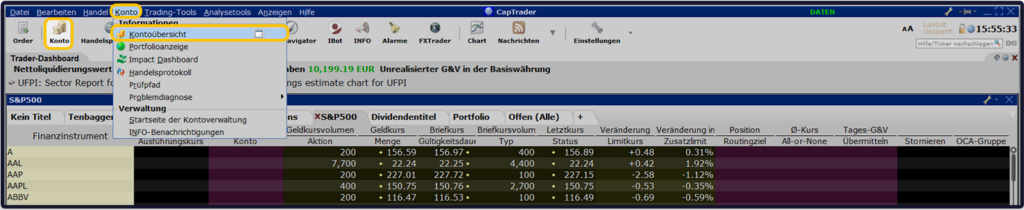
Open the account window in your TWS (Classic TWS view) by clicking the > button. Account or alternatively via the path > Account and > Account overview.
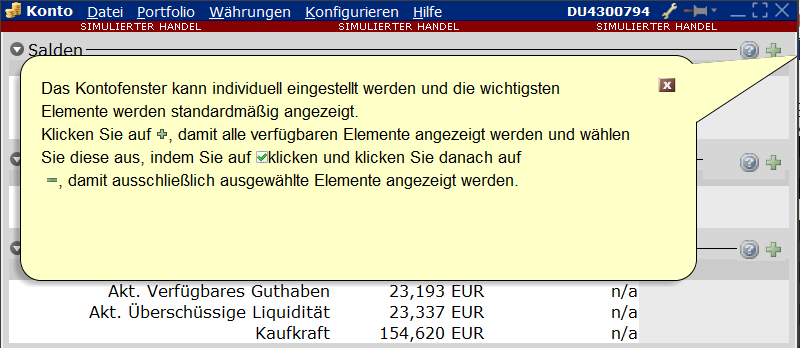
You can customize the account window to your liking by clicking on the green plus icon.
Note: If your securities account is held in Ireland (IBIE), please use the following page: Account window in the TWS
In the account window you will find the following tables (click to view the desired table directly):
- Balances (Balance in base currency)
- Margin requirements (Margin Requirements)
- Available for trade (Available for Trading)
- Market value Real FX balance (Market value-Real FX Balance)
- FX Portfolio Virtual FX Position (FX Portfolio - Virtual FX Position) and
- Portfolio.
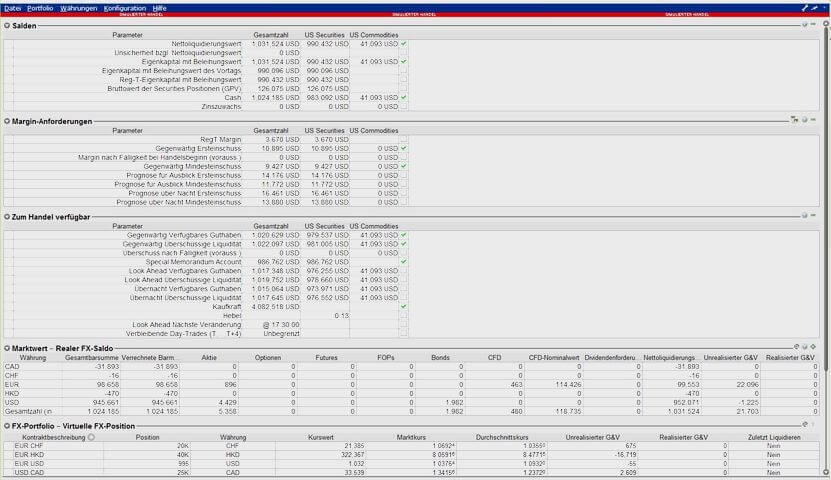
The total value is composed of the accounts UK Securities, UK Commodities and UK Regulated.
UK Regulated refers to the F sub-account of your securities account that you need to trade CFDs, precious metals and non-US index options.
You must manually deposit money to this account before you start trading: either directly via a deposit to the F-account (the purpose of your deposit must be to the F-account) or via an internal transfer (Instruction).
NOTICE: A capital reversal from the F sub-account to the Securities sub-account must be made manually by internal transfer.
The total cash balance of each currency is used as the basis for calculating interest payments, i.e. the sum of cash balances in all sub-accounts.
TABLE: BALANCES
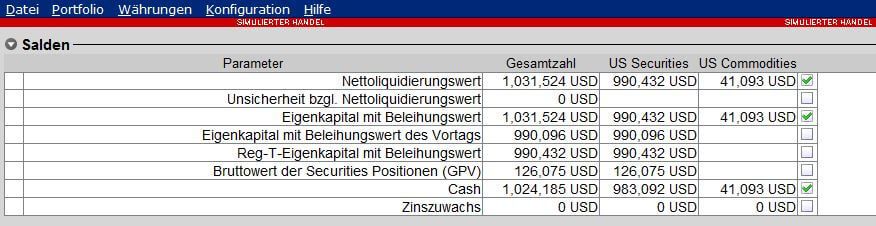
TABLE: MARGIN REQUIREMENTS
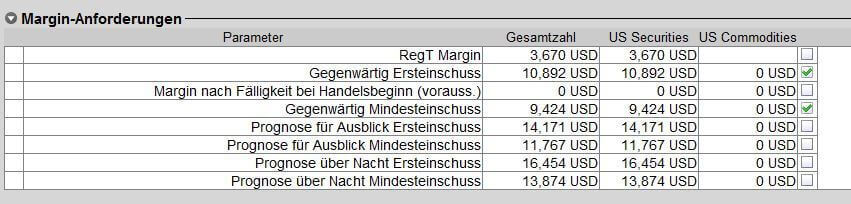
TABLE: AVAILABLE FOR TRADING
¹ Indicates the position Current available balance has a value less than or equal to zero at any time, no new positions can be entered into.
² Indicates the position Current excess liquidity If, at any point in time, the value of the portfolio is less than or equal to zero, portfolio positions may be liquidated.
Please also note our information page on Forced liquidations.
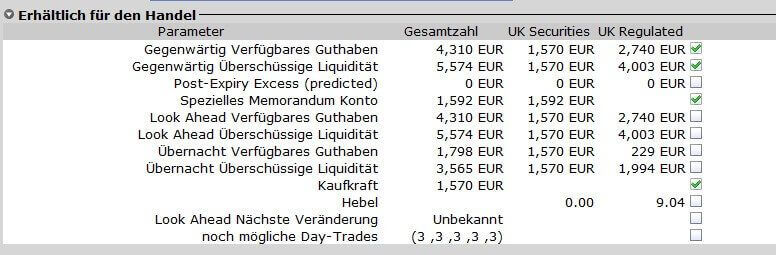
TABLE: MARKET VALUE - REAL FX BALANCE
This table shows your actual existing currency positions.
Configure your display by right-clicking on the column headers to open the menu, then >Set select and compile a list of your preferred data.

TABLE: FX PORTFOLIO - VIRTUAL FX POSITION
The table: FX Portfolio-Virtual FX Position shows you your currency conversions made in the past.
It shows No currency positions actually existingThe profits and losses displayed here are also to be understood as theoretical values. They only become relevant in practice when you execute the counter transactions (trades) belonging to the positions displayed here.
Actually decisive and meaningful regarding your cash positions is only the table Market value Real FX balance. Configure your display in the TWS by right-clicking on the column headers to open the menu, then >Set select and compile a list of your preferred data.

TABLE: PORTFOLIO
Tip: Check the box next to "Show rows with zero positions", to be able to see already closed positions in the portfolio on the respective trading day.
| Title | Description |
|---|---|
| Contract description | Symbol and description |
| Position | Number of securities/contracts (long or short) |
| Currency | Trading currency of the contract |
| Market Value | Market value; calculated from (position)x(market price) |
| Market price | Market price; real-time value of the position |
| Average price | Average price of the position (incl. fees!) |
| Unrealized P&L | Unrealized profit/loss, calculated from the difference between the current market value of your open positions and the average price (incl. fees) |
| Realized P&L | Realized profit/loss from this contract |
| Liquidate last | In the event of a margin deficit in your securities account, the securities account will liquidate positions. Select "YES" for one or more positions (right-click on this field) so that these position(s) are only closed at the end or after all other positions. Please note: This information does not constitute a legally binding liquidation block! |

You can view all statements of transactions in your Bank statement call
The information listed there is legally binding.