


On this page we show you what you can find in the standard account statement at CapTrader in the individual categories of information about your securities account. You can create the account statement in the account management (Client Portal) of your securities account. You can find the corresponding instructions here: Create account statement.
Note: In your statement, please also always use the blue question mark icon on the right to view/explain the individual terms in the respective category.
For a better overview, we have divided this article into the individual categories of the extract, so that you can go directly to the respective area when searching for a desired piece of information. To do so, simply click on the respective category name in the following overview.
- Account information
- Net asset value
- Mark-to-Market Performance Overview
- Overview of realized and unrealized performance
- Cash Report
- Open positions
- Foreign exchange positions
- Net equity position overview
- Transactions
- Transaction fees
- Corporate actions
- Transfers
- Deposits & Withdrawals
- Fees
- Dividends
- Withholding tax
- Interest
- Accrued interest
- Change in the dividend case
- Details on rental fees
- Stock Yield Enhancement Program Securities Lent Activity
- Information on the financial instrument
- Codes
ACCOUNT INFORMATION
In this section you will find general information about your securities account.
- Name: Name of the deposit holder.
- Account: The deposit considered in this deposit statement.
- Incl. accounts: Sub-accounts and mirrored securities accounts included in the securities account statement are listed here.
- Customer type: Refers to the ownership of the deposit (individual account, joint account, company account, etc.).
- Account authorizations: Type of account management (Cash or margin deposit).
- Base currency: The base currency is the currency for the primary display of your account balances.

NET ASSETS
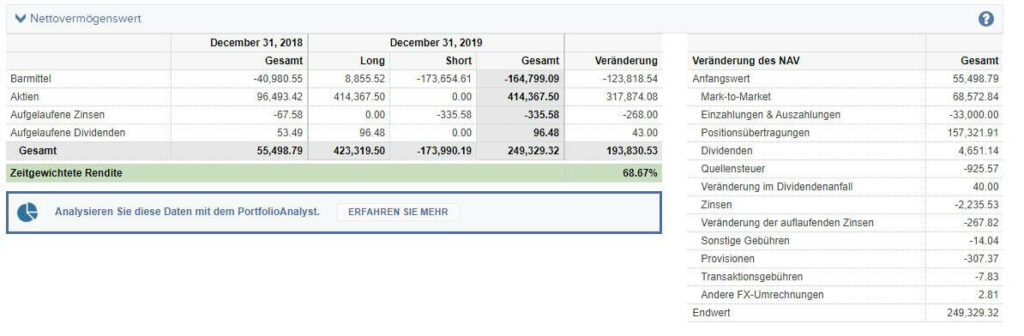
The Net Asset Value tab is about valuation changes. The Net Asset Value (NAV) shows the value of your portfolio. In this section you can view the absolute change in the value of your securities account, as well as your percentage performance over the time period selected in the statement.
The time-weighted return shown to you here does not indicate the percentage change in the value of your securities account. Instead, it is intended to calculate a performance that is solely attributable to the actions of the securities account holder and is not influenced by other fluctuations in the size of the securities account (for example, deposits and withdrawals). For this purpose, the performance period is divided into sub-periods when cash flows occur (for example, deposits and withdrawals). Now, a separate return is calculated for each sub-period. Subsequently, these sub-period returns are linked again to calculate a time-weighted return.
The profit under "Cash" in the left-hand table can be seen in the Cash report tab as the difference between the opening and closing balance. If you have not actively traded, only dividends and withholding tax are credited here. Imputed profits from your foreign currencies are also credited to you.
A profit/loss for "Equities" in the left-hand table results from the mark-to-market losses in the Mark-to-Market Performance tab (i.e. the total valuation changes of your positions including "two-round effects" if gains in foreign currencies arise in addition to price gains) minus the cash actually received from the line above.
If you want detailed analysis on the return of your portfolio, you can also access the PortfolioAnalyst. The PortfolioAnalyst is only available for live accounts. Demo accounts cannot be viewed.
MARK-TO-MARKET PERFORMANCE OVERVIEW
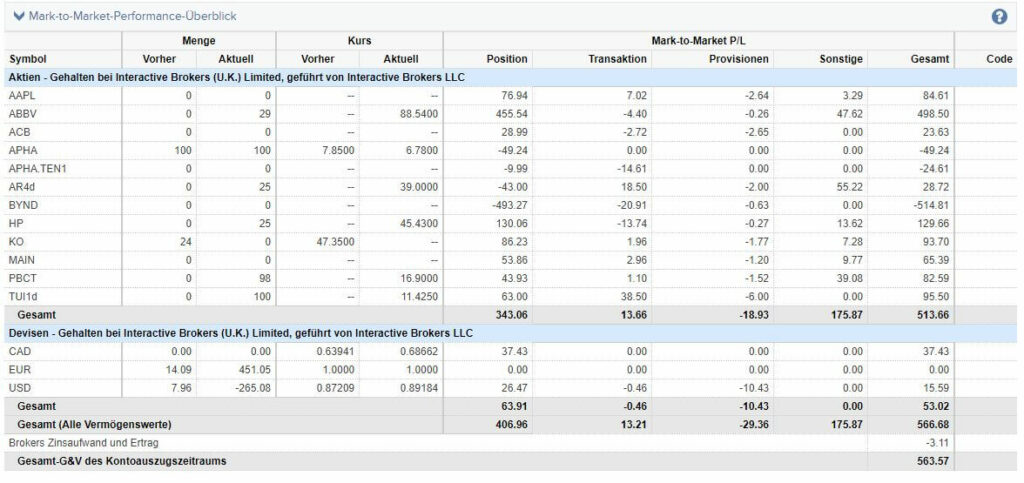
This section shows pure changes in the value of the portfolio based on closing prices. However, it does not include any profit or loss analysis due to position closing. These can be found in the Transactions section.
Considerations of the methodology "Mark to Market" (MTM) do not distinguish between realized and unrealized income. It is the book value change of your positions over the selected statement period.
"Position" includes all valuation changes of positions that have not been opened or closed during the statement period, while in "Transaction" appear all valuation changes of pieces that have been traded within the period.
It should also be noted that the figures are converted into the base currency and that currency gains/losses are included in the calculation.
Commissions and other costs (total amounts of dividends, withholding tax, P&L from corporate actions, coupons, and accrued bond interest) are also moved out to separate columns, as they cannot be captured by the difference in closing security prices.
OVERVIEW OF REALIZED AND UNREALIZED PERFORMANCE
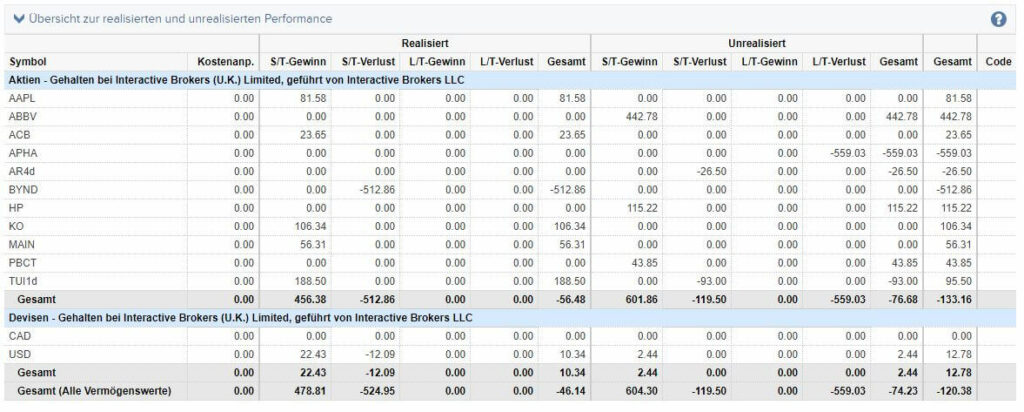
This table shows a summary of realized and unrealized gains and losses in the various classes of securities. The realized amounts shown have been translated into base currency using the closing date of the position. Unrealized gains and losses are translated into base currency using the last closing currency rate for the statement period.
The columns Profit and loss show the cumulative gains and losses respectively. The sum of gains and losses is shown in the column Total are shown. Realized and unrealized gains and losses are summarized in the last column.
S/T stands for Short Term and relates to positions with a holding period of less than 365 days.
L/T stands for Long Term and relates to positions with a holding period of more than 365 days.
Cost Adjustment shows adjustments made to the cost basis. In the case of tax-free dividend payments, the cost price (cost basis) of a security is adjusted for accounting purposes. This means that a corresponding capital repayment is only taken into account for tax purposes when the position is closed.
CASH REPORT
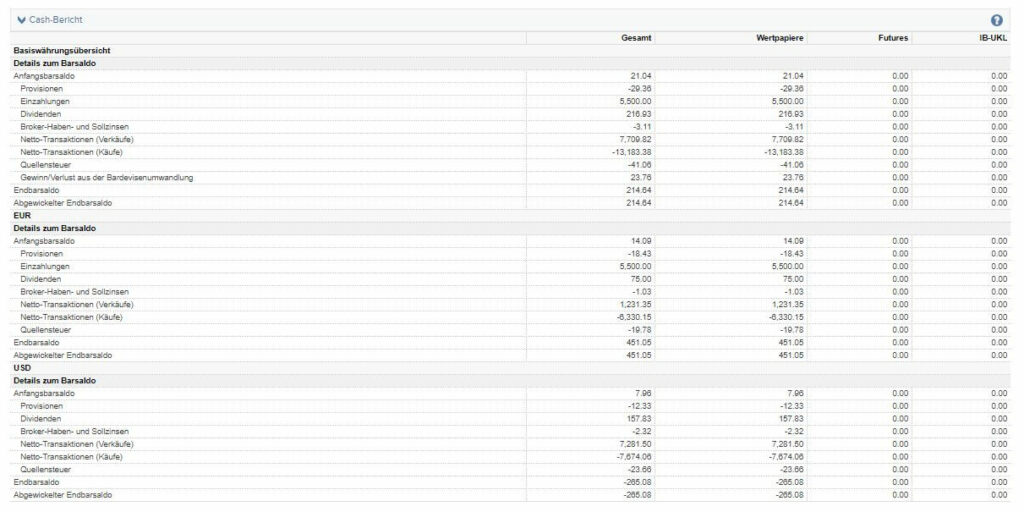
You can see the changes in your cash in the cash report. The cash report is broken down into different currencies. The top section gives you an overview of the entire cash position, converted into the base currency.
- Opening cash balanceCash position at the beginning of the period (in the specified currency or accumulated and converted into the base currency)
- CommissionsCommissions paid in the selected period
- Internal transfers: (partly automatic) money movements between the sub-accounts of your custody account
- DividendsDividend payments received
- Broker credit and debit interest: Interest paid or received in the selected period (cumulative)
- Cash Settling MTMShows mark-to-market gains and losses from positions in futures and options with cash settlement. More information on MTM considerations can be found in the Mark-to-Market Performance Overview tab.
- Payment in lieu of dividendsDividend compensation payments received (e.g. for CFDs & short positions)
- withholding tax: Withholding tax withheld on dividend payments and dividend equalization payments
- Trading transactions (sales): Cash flow-in due to disposals
- Trading transactions (purchases)Cash flow out due to purchases
- Other feesOther fees paid in the selected period (e.g. market data)
- Ending cash balanceCash on hand at the end of the period
- Unwound closing cash balanceCash on hand at the end of the period (after settlement period)
Cash FX conversion profit/loss
The actual gains or losses (if any) cannot be determined as long as the foreign currency position has not been closed. The amount shown under "Cash FX translation gain/loss" is therefore not actual realized gains or losses.
Cash FX conversion profit/loss for any given non-base currency is determined by first forming the difference between the current and previous period's base currency exchange rates (current period's exchange rate - previous period's exchange rate of the respective account statement).
This difference (positive or negative) is multiplied by the cash opening balance of the current statement period to determine the value of the cash FX conversion profit/loss.
OPEN POSITIONS
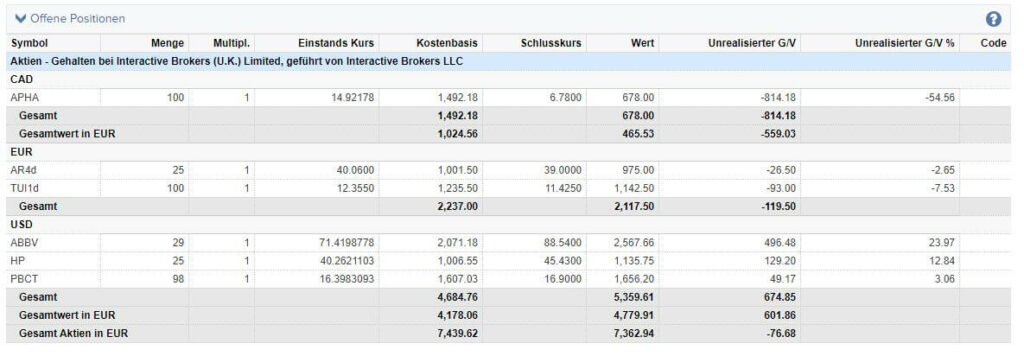
Here you can see a list of the positions that were in your securities account at the close of trading on the last day of the withdrawal period.
- Symbol: The symbol is used to identify the security in the trading platform. It is also called an "abbreviation".
- Quantity: The number of units in the respective security held in your securities account at the end of the withdrawal period and at the close of trading.
- Multiplier: This key figure determines the contact size for derivatives. For example, a contract for a stock option that includes the right to buy 100 stocks has a multiplier of 100.
- Cost price: The price at which you purchased the security. The commission incurred is already offset against the price.
- Cost basisThe total costs incurred in setting up the position. Including commissions. The value results from the purchase price multiplied by the quantity.
- Closing price: The closing price of the security on the last day of the withdrawal period.
- Value: The total value of the position on the last day of the withdrawal period. The value is calculated by multiplying the closing price by the quantity.
- Unrealized G/V: The unrealized gain or loss results from the value less the cost basis.
FOREIGN EXCHANGE POSITIONS
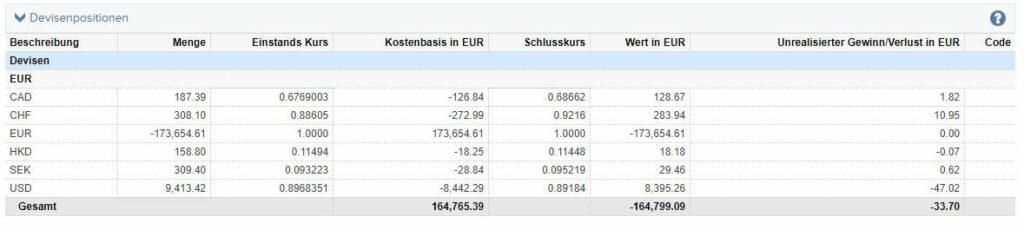
Here you can see the foreign currency holdings in your securities account at the end of the statement period. In addition to the actual holdings under the "Quantity" column, the last exchange rates to the base currency (closing rate) and the equivalent value of your foreign currency holdings in the base currency are also displayed.
NET STOCK POSITION OVERVIEW
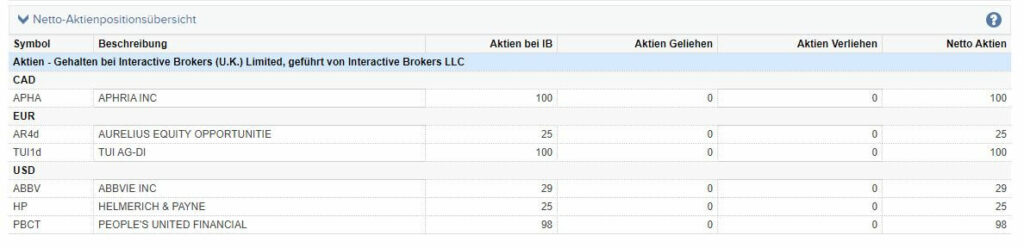
You will find an overview of your stock positions here:
- Stocks at IB: Your total number of stocks held
- Stocks BorrowedFor short sales, the number of stocks borrowed.
- Stocks Lent: Stocks borrowed by other short sellers
- Net stocks: Total number of stocks held less borrowed and lent stocks.
TRANSACTIONS
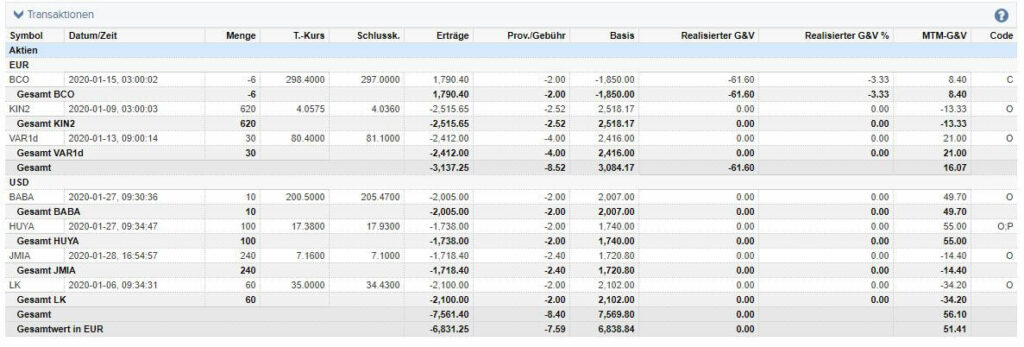
This section shows all purchases or sales that you have made during the statement period. The transactions are sorted first by security class, then by currency and finally alphabetically by security symbol.
- Symbol: The symbol is used to identify the security in the trading platform. It is also called an "abbreviation".
- Date/TimeTime and date of transaction execution.
- QuantityThe number of securities moved with the transaction.
- T. course: The trade rate at which the transaction was executed.
- Final sk.The closing price of the security on the day of the transaction.
- Proceeds: The proceeds generated by the transaction. Does not include fees or commissions. The value results from the T. rate multiplied by the quantity.
- Prov./fee: Trading commissions and fees incurred as a result of the transaction.
- Basis: Shows you the cost basis of the position, i.e. the total amount of money used to open the position. In the case of a short sale, the amount of money received minus the commission paid is displayed.
- Realized P&L: The gain or loss realized on the transaction.
- MTM-G&VThe difference between the trading price and the closing price, multiplied by the quantity. More information on MTM considerations can be found in the section "Mark-to-market performance overview".
- Code: Codes that give you further information on the individual transactions. All codes are listed in the "Codes" section.
Gains and losses are reported in this category for all realized (closed) transactions. Commissions are netted to calculate the cost basis and realized gains or losses. For the MTM-G&V, commissions are not netted and are shown as a separate line in the > Mark-to-Market Performance Overview.
TRANSACTION FEES
If a transaction has special charges - for example due to national regulations - they will appear here. In the example you can see the payment of the French transaction tax when buying stocks in France.

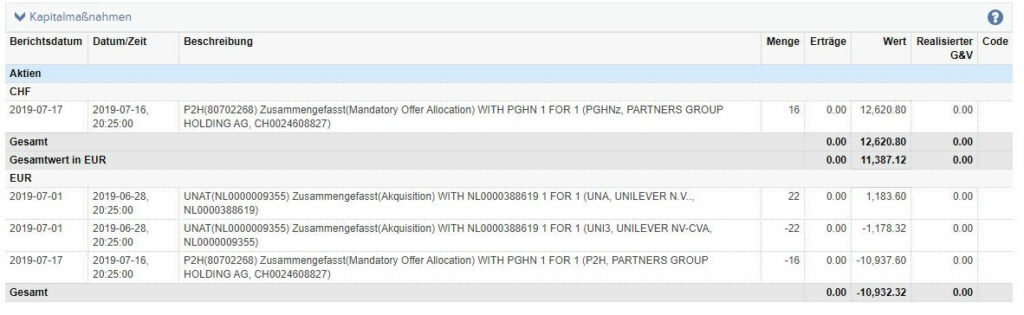
CAPITAL MEASURE
Here you can see corporate actions that were performed in your securities account during the move-out period.
You can also view detailed information directly on the website of the relevant company in the "Investor Relations" section.
TRANSFERS
This section shows position transfers to or from another broker. The section also shows internal transfers and transferred lots.
DEPOSITS & WITHDRAWALS
This section lists the payment transactions of your securities account.
- Internal Transfer: Transfers between different CapTrader securities accounts. Also includes transfers between sub-accounts.
- Disbursement: Regular withdrawal from your CapTrader custody account to an external account.
- Electronic credit transfer: Regular deposit from an external account to your CapTrader account.

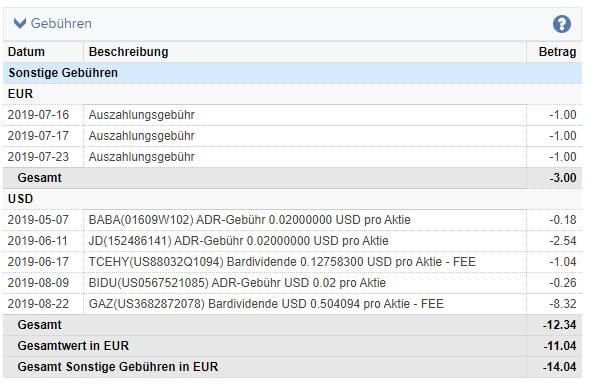
Fees
All charges for the securities account are displayed in this section. The corresponding fees are always debited from your securities account in the base currency. The conversion takes place on the debit date at the valid closing rate between foreign and base currency. The fees include:
- Fees for market data packages: The fees for chargeable market data packages are billed monthly. The booking is made at the beginning of each month.
- Financing costs for CFD positions: When buying and then holding a CFD for several days, financing costs are incurred. In contrast, as the seller of a CFD, you receive financing proceeds under certain conditions.
- Order deletion or order modification fees: This is only incurred at certain trading centers.
DIVIDEND
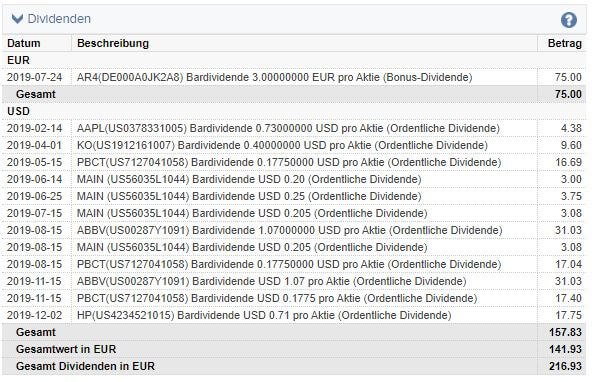
In this category, the following are already Dividend distributions displayed.
Please note that the Withholding taxes on dividends are withheld directly by the clearing houses and are therefore not distributed to your securities account. You can find an overview of the withholding tax withheld in the "Withholding tax" section.
The amount of each distribution is displayed in the distributing currency.
For your convenience, the total value converted into base currency is also shown.
SOURCE TAX
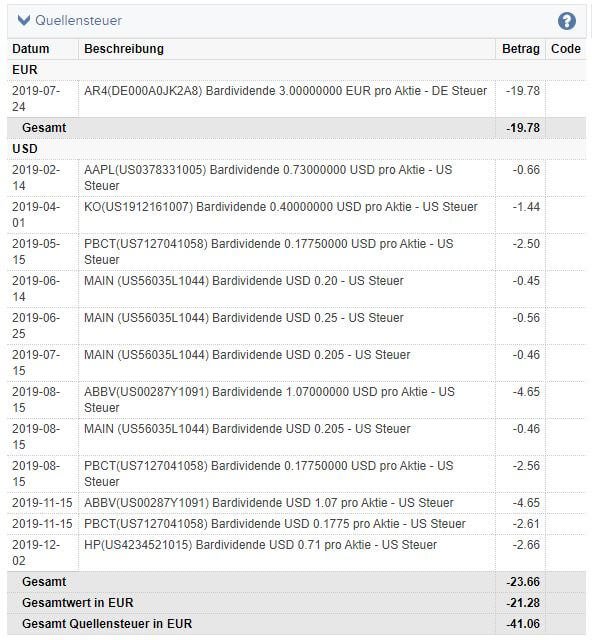
This section shows the withholding tax withheld on dividends and interest income.
Withholding taxes are withheld directly by the clearing houses (in the country of distribution/"at source") and are therefore not distributed to your custody account.
Further information on avoiding withholding tax on interest income can be found at here.
Information on withholding tax certificates for stock dividends can be found here.
If required, you can have withholding tax certificates issued for a fee in addition to this overview. The preparation of a withholding tax certificate incurs the following fees per securities position and per document:
- German stocks: €30
- French stocks: €125
- Swiss shares: 0 CHF
- Austrian shares: € 0
- Spanish shares: 50 €
- Norwegian shares: NOK 0
- Belgian shares: € 0
- British shares: 0 GBP
- Danish shares: DKK 0
- Finnish shares: €15
- Italian shares: €25
- Swedish shares: SEK 0
The fee will be deducted directly from your securities account balance. You can track the posting in the account statement under the item "Fees".
Ordering the withholding tax certificate in your account management/client portal under >Support >Message center >Create new ticket.
Then please fill the ticket according to the following pattern:
- Select "Withholding tax certificate" as the subject.
- Select "Account statements & tax certificates" as the topic and then "Tax forms".
- Enter your securities account number.
- Please summarize your request in a short text
Please note that the preparation of your withholding tax certificate usually requires a processing time of 4-6 weeks. If a company has made several distributions or dividend payments per year, separate withholding tax certificates must be issued for these.
You can see actual dividend payments received in the category > Dividends.
INTEREST
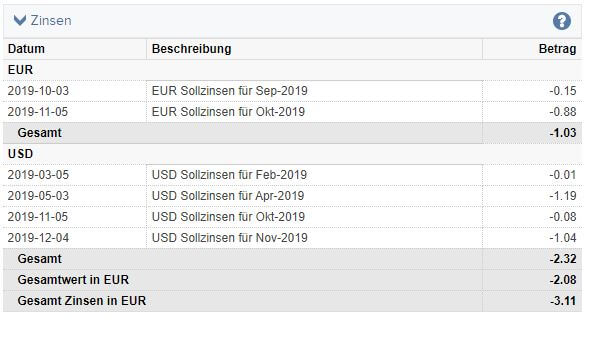
In this section you can see the interest paid and received during the reporting period.
Interest is calculated daily and debited at the beginning of the following month. Settlement takes place on the third bank working day of the following month. The interest already accrued in the current month is shown as interest accruals in the "Accrued interest" section.
- Loan interest rates: Credit interest from positive currency balances
- Debit interest: Interest from negative currency balances
ACCRUED INTEREST
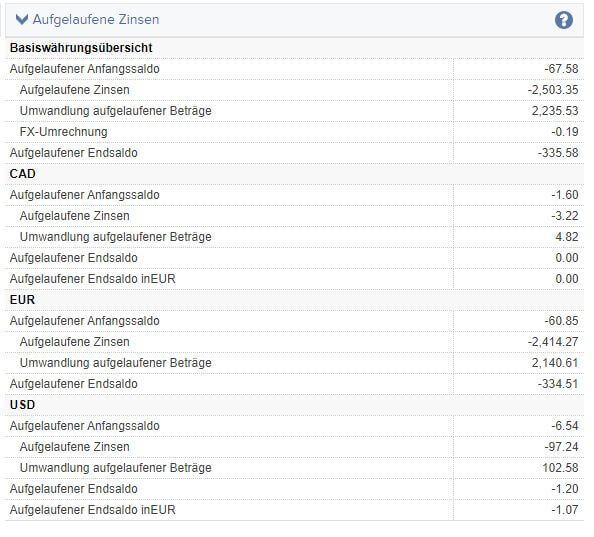
Interest is calculated daily via CapTrader but only posted once a month. The interest is booked on the third banking day of the following month. Accruals are created for the period between the accrual and posting of interest. You can examine the development of your interest accruals in the section Accrued Interest.
- Accrued opening balance: Amount of interest accruals at the beginning of the reporting period.
- Accrued interest: Total interest accruals over the entire reporting period. If you create a report for several months, the interest accruals shown here will again already have been partially or fully reversed.
- Conversion of accrued amounts: As soon as interest is recognized at the beginning of the respective following month, the interest accruals can be reversed. This line totals the value of all reversed interest accruals over the entire reporting period.
- Accrued closing balance: Amount of interest provisions at the end of the reporting period.
CHANGE IN THE DIVIDEND CASE
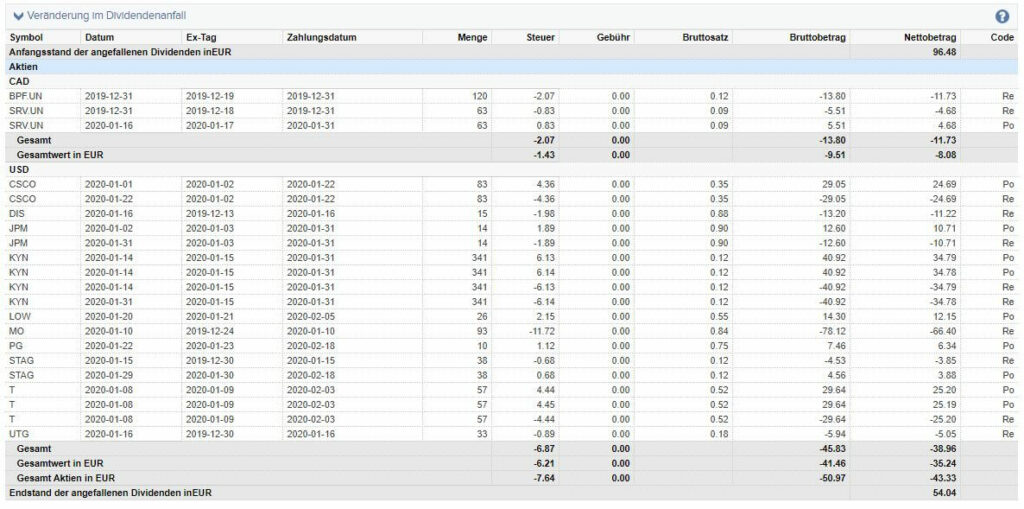
All shareholders who are entitled to dividend payments at the close of trading on the dividend record date (Subscription right date) were holders of the share. The actual payment of the dividend, on the other hand, takes place on the payment date.
In the period between the dividend record date and the payout date, you have not yet received an actual payment, but you are already entitled to dividends. CapTrader will already credit these future payments to you for accounting purposes. The payments expected in the process are often adjusted several times. In this section you can trace the accounting operations necessary for adjustment.
You can see actual dividend payments received in the category > Dividends. The transfers shown here are relevant for the margin ratio "Equity with LTV", but they are not physical payments.
DETAILS ON RENTAL FEES
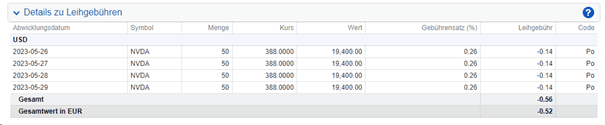
This section shows details of borrowed shares from short positions.
Rental fees are charged daily, which means that a separate rental fee calculation is listed for each day.
- Course: The price at which the shares were borrowed
- Value: Indicates the total value of the borrowed shares. The value results from the price multiplied by the quantity.
- Fee rate (%): The fee rate is given as a percentage and indicates the rental fee per year.
- Rental feeIndicates the fee incurred for stock lending for the respective day. The lending fee is calculated by multiplying the value by the fee rate as a percentage divided by 365 days.
STOCK YIELD ENHANCEMENT PROGRAM SECURITIES LENT ACTIVITY
This section for clients participating in the Stock Yield Enhancement Program shows the lending activity of the securities lent.
- SymbolThe symbol of the security lent.
- Date: The date of the award.
- QuantityThe number of shares lent.
- Security amountThe security amount received for the loan.
INFORMATION ON THE FINANCIAL INSTRUMENT
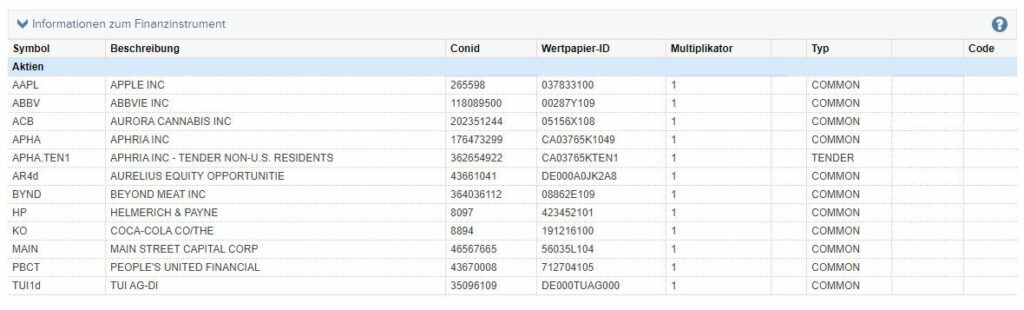
All products that you have traded or held in your securities account during the reporting period are listed here.
CODES
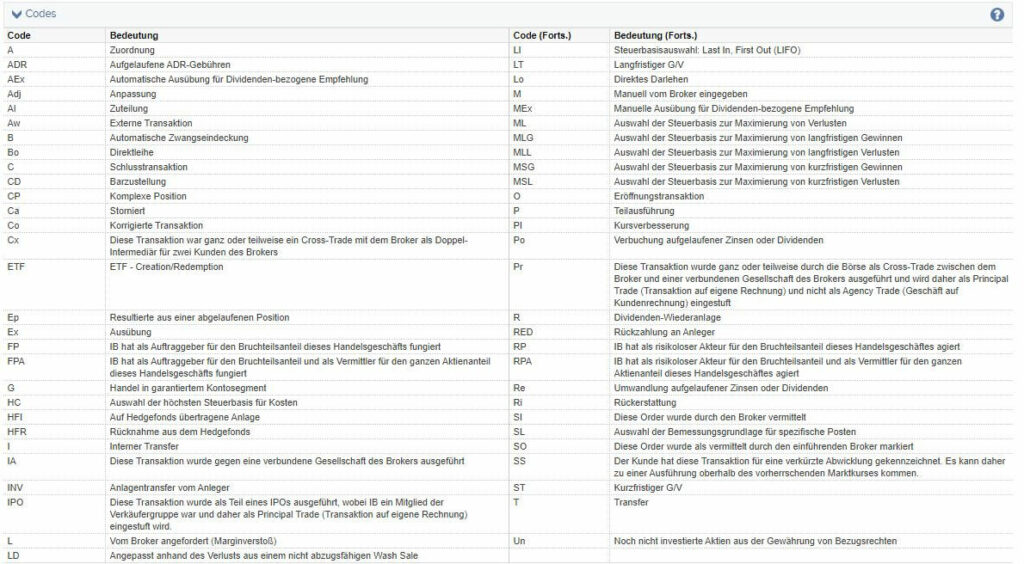
The abbreviations used in the other categories are listed and explained again here.
Video: Further information on the account statement
In the exclusive CapTrader Plus customer area, we have provided you with a very detailed video of the entire account statement. As a CapTrader customer, you are welcome to log in here: CapTrader Plus.